Character Consistency in Golpo AI: The Complete Guide to Recurring Characters
Character Consistency (BETA) lets you keep the same character across every scene of a Golpo video and across every video in a series. Give a character a name, an appearance description, and an optional reference image, and Golpo carries that character forward, frame by frame. This guide covers what the feature is, where to find it on the create page, how to write a description that renders reliably, and five real examples with the exact character setups and finished videos. Available on the Scale plan.

The single most common request we hear from Golpo users is not "make the video longer" or "add more languages." It is "please keep the character the same." A curly-haired teacher in the first scene should still be a curly-haired teacher in the last scene. The owl mascot who introduced the lesson should still be the same owl at the recap. Character Consistency is the feature that solves that problem, and as of this quarter it is available on Golpo's Scale plan in BETA.
This guide is the complete walkthrough. What the feature actually does, where to find it on the create-video page, how to write a description that renders reliably, and five real examples from our own team with the exact character setups and the finished videos they produced. If you have ever wanted a recurring host, a brand mascot, or a two-character story that stays coherent from opening frame to closing frame, this is the page for you.
TL;DR
- What it is. A BETA feature that lets you define recurring characters (name, description, optional reference image) that stay consistent across every scene and every video.
- Where to find it. The Characters (BETA) section on the create-video page, right below Video Instructions.
- Two required inputs. Character Name (up to 50 characters) and Appearance Description (up to 500 characters). Reference Image is optional but strongly recommended.
- Reference image limits. PNG, JPG, or WebP, up to 10MB. Full-body single-character shots on plain backgrounds work best.
- Plan. Available on the Scale plan at $999.99/month ($833.32/month billed annually). Character library carries across future videos when you check "Save for later."
- Best for. Course series, brand mascots, animated shorts, two-character stories, education-first channels.
→ What Character Consistency is · Why it matters · Where to find it · How to add a character · Five real examples · Description best practices · Reference image tips · Common use cases · Plan availability · FAQ
What Character Consistency actually is
Every AI video tool has a version of the same problem. You describe a character in scene one and by scene four the model has quietly redrawn her hair a different color, changed her outfit, and turned her sneakers into loafers. The story feels off. Viewers notice, even if they cannot articulate what changed. That is the "character drift" problem, and it is why AI-generated stories with named characters have historically felt less watchable than the same story told in cartoons or live action.
Golpo's Character Consistency feature is a constraint you give the model up front. You define who a character is: a name, a specific appearance description, and optionally a reference image. That definition is then held constant as the model plans and renders every frame of the video. The teacher stays curly-haired. The robot stays teal. The four-person startup team looks like the same four people in every meeting scene. It is a small change to the generation pipeline and a large change to how watchable the output feels.
Why it matters
Character consistency changes what you can make with AI video, not just how it looks. Four specific shifts:
- You can tell a story with named characters. Before consistency, AI video was best at concept-first explainers where nobody appeared twice. With consistency, you can build narrative shorts where the audience recognizes and roots for a specific character across scenes.
- You can build a series. Every course has an implicit host. Every YouTube channel has a face. With Character Consistency, that host can be a stylized character you designed once, appearing across every episode without a camera or a voice actor.
- You can protect a brand. Companies that use a mascot in marketing (an owl for education, a mouse for insurance, a specific brand character) can lock the mascot in and reuse it across dozens of videos without drift.
- You can teach with a recognizable figure. Explainer videos are more memorable when a viewer identifies with the person on screen. A consistent illustrated character gives you that recognition without asking a real teacher to sit for forty video shoots.
These use cases were possible on other AI video tools too, but they usually required frame-by-frame editing, custom LoRA training, or paying an illustrator to keep everything on-model. Character Consistency in Golpo folds the same job into the normal generation pass, which is a much smaller lift.
Where to find it on the create-video page
On the Golpo playground create-video page, scroll past the prompt input, the script input, and the Video Instructions field. You will find a section labeled Characters (BETA) with the subheading Add characters for consistent appearances across the video. On the right side of that section header there are two links: My Characters (which opens your saved character library from past videos) and + Add Character (which opens the setup modal for a new character).
The section sits just above the Color Fill In toggle and the standard Music, Duration, Voice, Orientation, Languages, and Style controls. If you do not see the Characters (BETA) section, you are either on a plan that does not include the feature yet or the beta flag has not rolled out to your account. Users on the Scale plan should see it by default.
How to add a character, step by step
The Add Character modal is deliberately simple. Three inputs, one optional file upload, one checkbox. Every field is validated in real time so you always know how much room you have left.
Step 1. Click "+ Add Character"
The modal opens with a purple person icon in the header and the subtitle "Define a character for visual consistency." Nothing gets saved until you click the Add Character button at the bottom right.
Step 2. Enter a Character Name (up to 50 characters)
Something short and memorable. The name is how the model refers to the character internally and how you will find the character later in your library. Examples: Ruby, Wolf, Detective Graves, Professor Pip, Luna. Keep it under a handful of words. Avoid punctuation that could confuse the pipeline.
Step 3. Write an Appearance Description (up to 500 characters)
This is the field that does the heavy lifting. Golpo's own placeholder example is a good template: "8-year-old girl with long auburn hair in braids, wearing a bright red hooded cape, white dress with blue apron, carrying a small wicker basket." Notice how specific it is. Age, hair (color, length, style), outfit (top, bottom, accessories), and a distinctive prop. That level of detail is what keeps the character on-model across scenes.
Step 4. Upload a Reference Image (optional but strongly recommended)
PNG, JPG, or WebP up to 10MB. A single, clear, front-facing view of the character on a plain background is ideal. Full-body works better than headshots for most video formats because Golpo composes scenes that include the character's full form. For a mascot or a non-human character (an owl, a robot, an anthropomorphic animal), the reference image is the difference between a decent result and a genuinely on-brand one.
Step 5. Save for later, and generate
Tick the "Save for later" checkbox if you want the character to stay in your library for future videos. Then click Add Character. The character now appears in the Characters section of your create page. Add more if you have a two-character or four-character story. When you click Generate Video, Golpo carries every defined character through every scene it composes.
Five real examples from our team
The best way to understand what Character Consistency actually produces is to see it. We ran five test videos over the last two weeks, each with a different character setup, and published the results as-is (no manual scene editing, no character redraws). Below are the character reference images we uploaded, the concept, the Golpo style used, and the finished videos. All examples are horizontal orientation at three to four minutes.
Example 1. Maya: same character across eight worlds
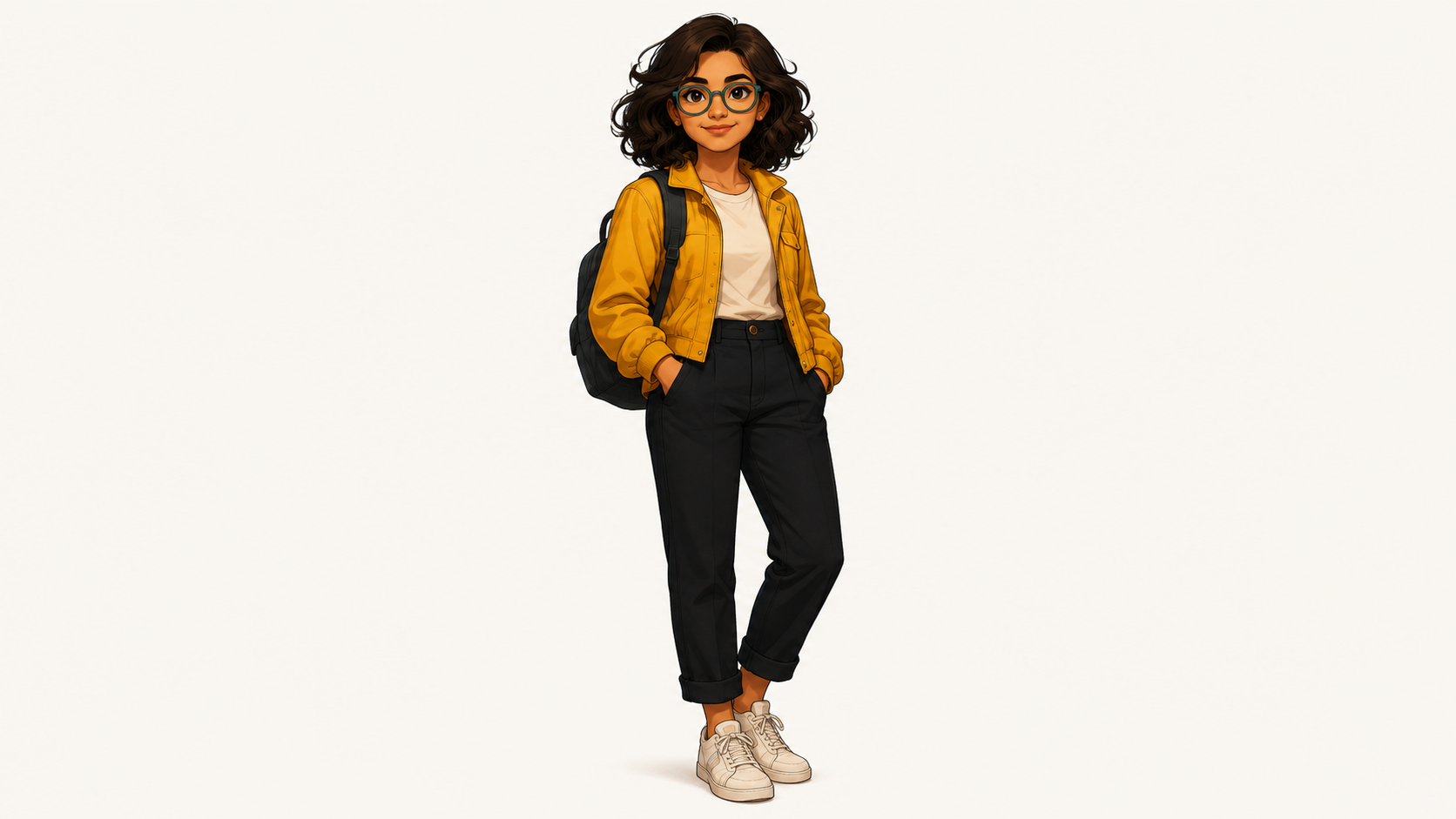
Setup. A single character used across many different environments. Maya is a young woman with dark curly hair, teal round glasses, a yellow denim jacket over a cream t-shirt, black tapered trousers, white sneakers, and a black backpack. The design is deliberately friendly and lesson-ready, so she can carry a course or a series without feeling like a lecturer.
Why this test matters. One character, many worlds. The video puts Maya into eight different scenes (classroom, city, workshop, forest, more) and she stays visibly the same person across all of them. This is the single most requested setup from course creators who do not want to appear on camera. Design one host, save her to your library, every lesson going forward stars her.
Same Maya, Eight Worlds. One uploaded reference, eight environments, no drift.
Example 2. Luna & Bolt: a girl and her robot friend
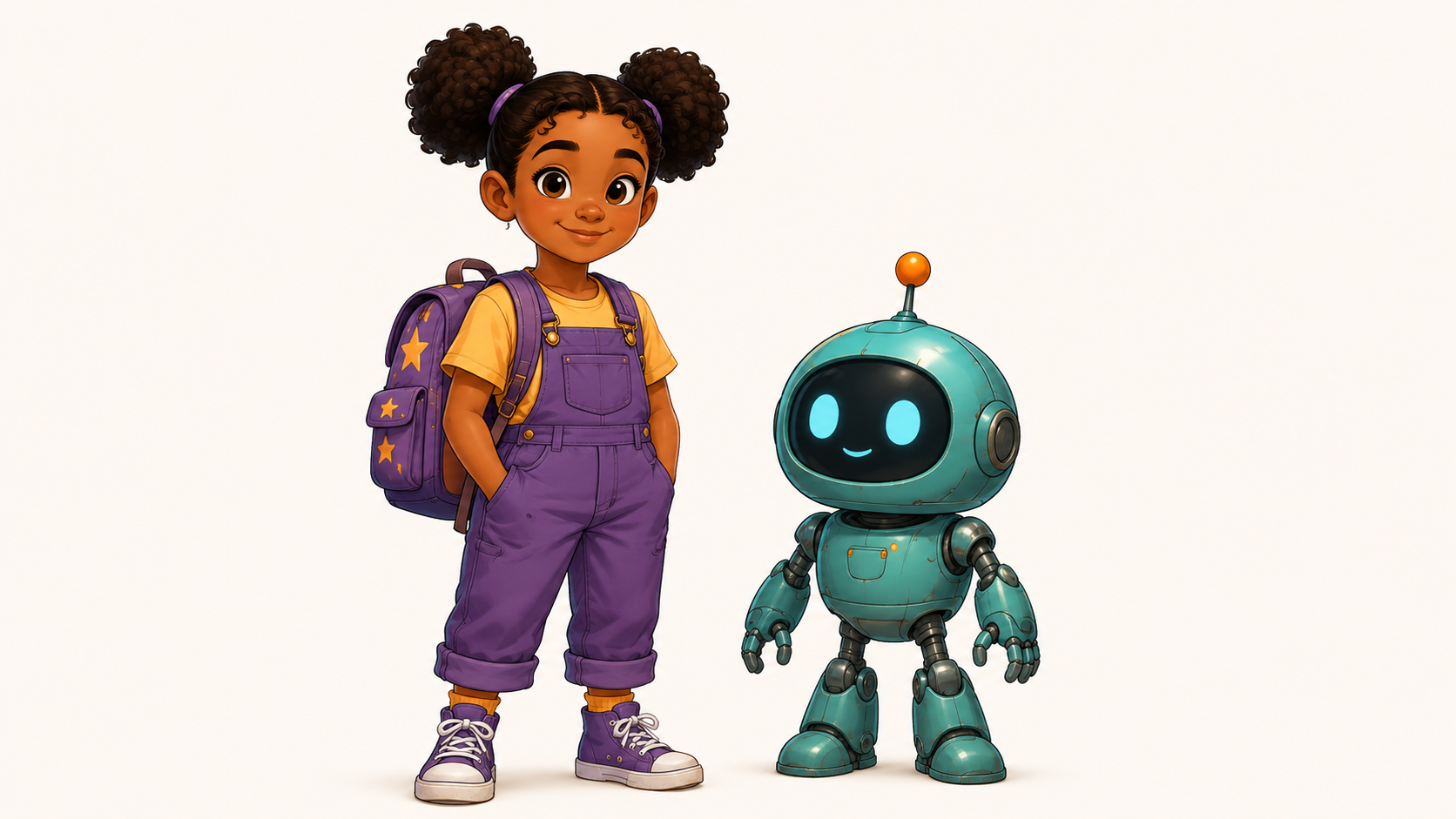
Setup. Two characters, one of them non-human. Luna is a curious young girl with dark curly hair in pigtail puffs, purple overalls, yellow t-shirt, and a star-decorated purple backpack. Bolt is a small teal robot with a rounded head, glowing orange antenna, blue LED eyes, and articulated arms. Both were saved to the character library for future episodes.
Style used. Golpo Sketch Crayon. The warm crayon texture pairs nicely with a bedtime-story feel.
Why this test matters. Two-character stories with a non-human companion are one of the hardest consistency asks. A generic robot could easily drift into a different shape each frame. Bolt does not. The reference image is doing most of the heavy lifting for a stylized character like this, and it holds up.
Luna and Bolt in Golpo Sketch Crayon. A stargazing story with both characters recognizable across every scene.
Example 3. Sam & Priya: Pause, Verify, Protect (phishing training)

Setup. Two coworkers. Sam is the employee: young man in a blue crewneck sweater, black glasses, dark jeans, and brown leather shoes. Priya is the manager: a professional woman with dark shoulder-length hair, a forest-green blazer, black slacks, and a red notebook in hand. Everyday workplace characters, deliberately underplayed so they can carry a security-awareness training module.
Style used. Formal (legacy) with a Video Instruction set to semi-photorealistic. This pushes the render toward a slightly more realistic office aesthetic while keeping the characters recognizable frame-to-frame.
Why this test matters. Corporate training is the workhorse workload for Character Consistency. Two recurring characters across a compliance module make the training feel like a story rather than a slideshow. This is the format that most training videos get wrong and it is the format Character Consistency was designed for.
Sam and Priya walk through a phishing scenario. Formal (legacy) style with a semi-photorealistic Video Instruction.
Example 4. Professor Pip & Mia: the wise owl mascot
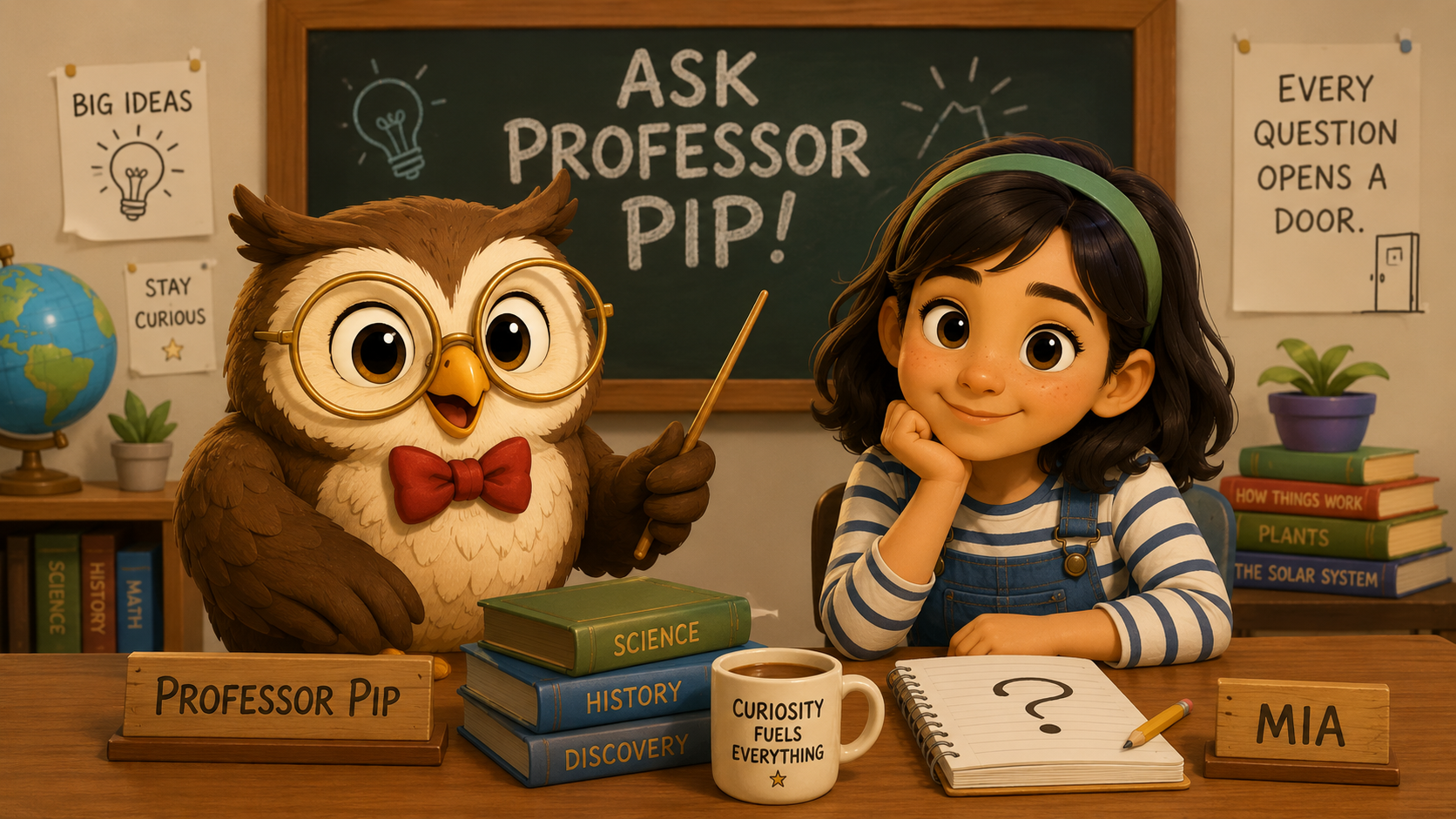
Setup. A mascot and a student. Professor Pip is a wise brown owl with large golden round glasses, a red bowtie, and a wooden pointer. Mia is a young student with dark shoulder-length hair, a green headband, a striped shirt under blue overalls, and a spiral notebook. Both were saved to the character library so every future "Ask Professor Pip" episode starts with the same two characters ready to go.
Style used. Golpo Sketch Formal. Slightly more polished than Crayon, and a good match for an educational mascot brand.
Why this test matters. Educational mascots are the highest bar for character consistency. If the owl grows different-shaped feathers in scene three or Mia's overalls change color at the recap, the whole "friendly-teacher" premise falls apart. This is the setup most children's channels, tutoring services, and edtech brands ask about.
Professor Pip and Mia in Golpo Sketch Formal. The owl stays the owl, all the way through.
Example 5. The Startup: four consistent teammates
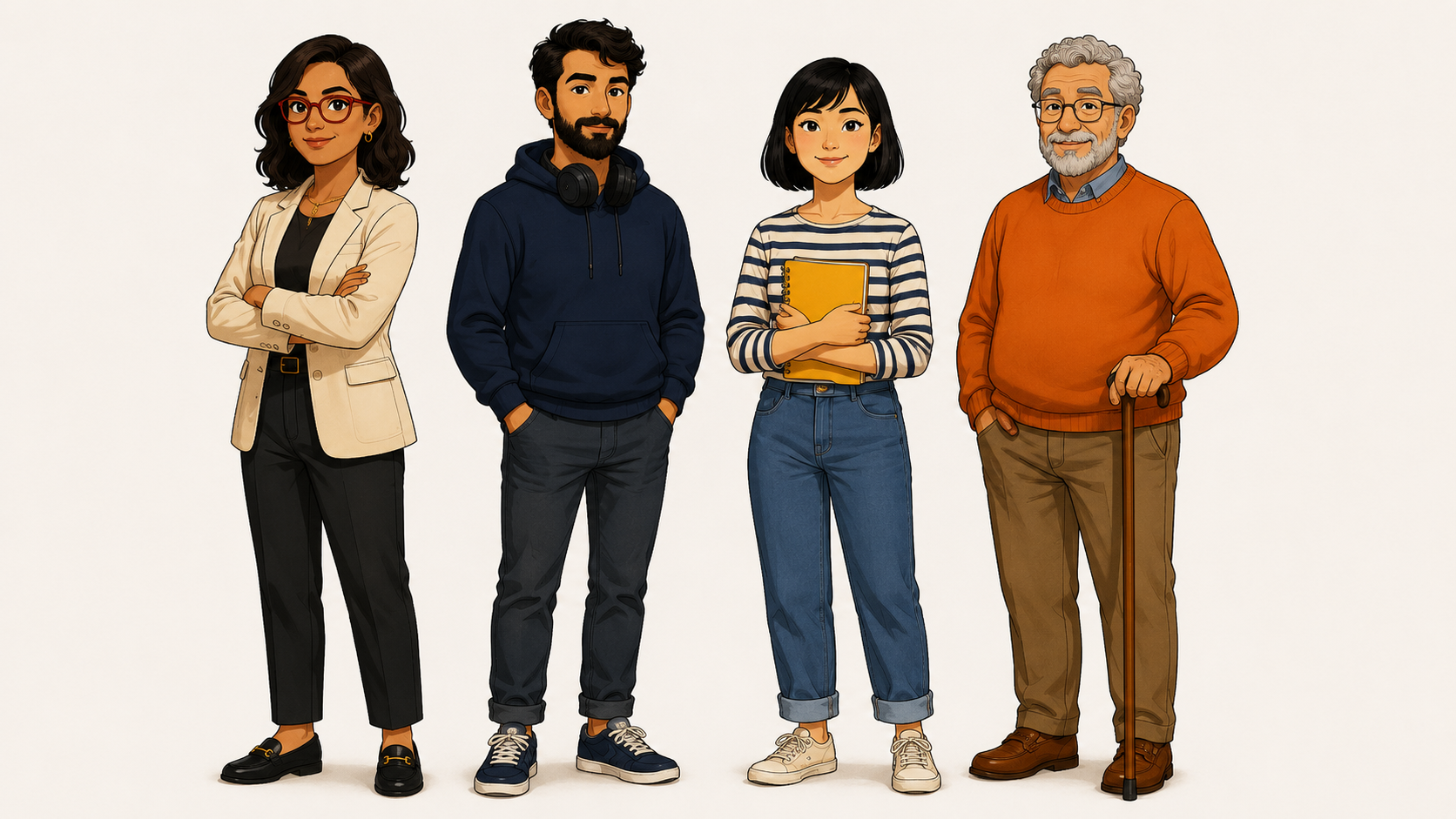
Setup. Four characters in a product-launch narrative. Anima is the CEO in a cream blazer with red glasses. Jorge is the engineer, bearded, in a navy hoodie with headphones. Mei is the designer, short bob, striped shirt, holding a yellow sketchbook. Daniel is the customer, gray curls, orange sweater, with a cane. Every character description sits in the 400-character range with age, build, hair, outfit, and one distinguishing prop.
Style used. Golpo Sketch, Improved (Beta). The style Character Consistency currently renders most reliably on.
Why this test matters. Four characters is the upper end of what we recommend for a single video. It is a genuine stress test of the consistency system, because every meeting scene has to render all four in the same style, the same room, and the same relative positions. If any single character drifts, the story visibly falls apart. This one does not.
Anima, Jorge, Mei, and Daniel across a full product-launch narrative. Golpo Sketch, Improved (Beta).
How to write an appearance description that actually renders
Half of the character-consistency skill is writing a description that gives the model enough to work with. After running dozens of test characters, here are the rules that consistently produce the best results.
- Lead with age and build. "8-year-old girl," "middle-aged man," "young adult woman," "elderly gentleman." This anchors proportions before the model gets to outfit details.
- Hair before outfit. Color, length, and style. "Dark curly hair in pigtail puffs" is a better anchor than "dark hair." Every additional detail here pays off later.
- Outfit top-to-bottom. Top, bottom, shoes. In that order. Include colors and any prints or textures. "Yellow denim jacket over cream t-shirt, black tapered trousers, white sneakers" is close to ideal length.
- One distinctive prop or accessory. Backpack, glasses, notebook, cane, bowtie. This becomes the anchor viewers use to recognize the character even in a busy scene.
- Do not describe expressions. "Smiling," "curious," "worried." Leave those to the scene context. The description is who the character is, not how they are feeling.
- Do not describe the background. The scene composition handles that. "Standing in a classroom" belongs in the prompt or script, not the character description.
- Skip photo-realism directives. Golpo's illustration pipeline does not render photo-realism well and prompts that ask for it produce weaker results. Say "illustrated" or "flat editorial style" if you want to reinforce the look, but let the pipeline handle the aesthetic.
The 500-character limit is generous. Use most of it. A three-sentence description that names age, hair, outfit, and one prop is usually the sweet spot.
Reference image tips
The reference image is optional but the difference between "consistent" and "spot-on" is usually the reference image. A few rules that make it work harder for you:
- Single character per image. Even for a two-character story, upload two separate reference images, one per character. Multi-character reference images confuse the pipeline.
- Plain background. White, cream, or a very soft gradient. A busy background distracts the model from the character.
- Full body when possible. Whiteboard and Canvas scenes often show characters in full. A headshot forces the model to guess at the outfit below the waist.
- Match the style you want the final video to have. If you upload a photo, expect photo-adjacent output. If you upload an illustration, expect illustrated output that respects it. Golpo's pipelines are illustration-first, so an illustrated reference is usually the safer choice.
- Under 10MB. PNG, JPG, or WebP. The compression on our end is lossless within reason, so a 3-5MB file is plenty.
- Reference sheet works well. A single image showing the character from the front, standing, in one clear pose is stronger than a collage of many poses.
If you look back at the five examples above, every reference image is a single-character, front-facing, plain-background sheet. That is not an accident. It is the format the pipeline reads best.
Common use cases
The teams getting the most value out of Character Consistency in the first few weeks of BETA fall into five buckets:
- Course series with a recurring host. Design a friendly instructor once, use them across an entire course. This is the Maya pattern above.
- Edtech mascots. An owl for a kids' science series, a wolf for a coding channel, a friendly monster for a math app. Save the mascot to your library and every episode starts with them ready to go.
- Corporate training with recurring characters. The Sam-and-Priya pattern for compliance, security, HR, and onboarding videos. Recognizable characters make the training feel like a series, which measurably improves completion. See our take on why training videos fail for context.
- Brand mascots in marketing. Insurance mice, telecom pigeons, telco dogs. Companies that already have a brand character can now put them in AI-generated explainers without redrawing them every time.
- Narrative shorts. Two-to-four character stories that need to hold together across three or four minutes of video. This is where AI video has historically struggled the most and where Character Consistency changes the most.
If your use case is a single explainer video with no named characters, Character Consistency will not do much for you. Skip the feature and go straight to standard whiteboard generation. But if you are building a series, a mascot-driven brand, or a story with recurring people, this is one of the most under-used features on Golpo right now.
Plan availability and pricing
Character Consistency is included in the Scale plan, which is $999.99 per month billed monthly or $833.32 per month billed annually. The Scale plan bundles Character Consistency (BETA) with 800 credits per month, up to fifty team members, bring-your-own-audio, additional advanced Sketch and Canvas styles, and every other advanced feature on the ladder.
If you are on Business ($499.99/month) today and Character Consistency is what you need, Scale is the upgrade to make. If you are on Creator or Growth and want to try the feature, the honest recommendation is to trial the Scale plan for a month, define the characters you actually want to reuse, and then decide whether the compounding value of a shared character library is worth the tier for your workflow.
Because the feature is in BETA, behavior can change between releases. We are actively improving character fidelity, expanding the styles Character Consistency renders best on, and rolling out multi-character scene composition improvements. Feedback from Scale-plan users is what shapes what ships next.
Frequently asked questions
Which Golpo plan includes Character Consistency?
Character Consistency (BETA) is available on the Scale plan at $999.99 per month ($833.32 per month billed annually), which includes 800 credits, up to 50 team members, and every advanced feature. It is currently in BETA, so behavior can improve between releases.
How many characters can I add to one video?
You can add several characters per video. In practice we recommend one to four characters for a two to four minute video. More characters than that make individual moments harder to track for viewers and diffuse the emotional throughline of the story.
Do I have to upload a reference image?
No. The reference image is optional. Golpo can generate a consistent character from just a name and an appearance description. That said, a reference image dramatically improves fidelity, especially for stylized designs, brand mascots, or non-human characters like an owl or a robot.
What are the reference image requirements?
PNG, JPG, or WebP up to 10MB. Best results come from a single, clear, front-facing view of the character on a plain background. Full-body poses work better than headshots for whiteboard videos, because Golpo composes scenes that often include the character's full form.
Can I reuse a character across multiple videos?
Yes. Check "Save for later" in the Add Character modal and the character is stored in your character library. On the next video you generate, you can pick that character back up from "My Characters" without re-entering the description or re-uploading the reference image. This is how creators build a mascot or a lesson-series host that shows up in every episode.
How specific should the appearance description be?
Specific enough that a stranger could sketch the character from your words alone. Include age, build, hair color and style, skin tone, outfit (top, bottom, shoes, accessories), and any distinctive features (glasses, beard, backpack, cane, bowtie). The 500-character limit is enough for real detail.
Does Character Consistency work with all Golpo styles?
Character Consistency works best with the Improved (Beta) and Canvas styles, which are illustration-first. It can be used with Sketch styles too, but the fidelity of the character is highest when the pipeline is generating illustrated frames rather than line-art whiteboard sketches. If you want a specific character front-and-center, pick a Canvas style. See every Golpo video style for the full menu.
What happens if my character description conflicts with the script?
The character description acts as a constraint on the visual, not the story. If your script mentions the character "wearing a spacesuit" but your description says "yellow jacket and jeans," the visual will bias toward your description. To swap outfits mid-story, use two characters with different descriptions (for example, "Maya casual" and "Maya spacesuit") and reference them by name in the appropriate scenes.
Try it
Open the Golpo playground and set up your first character. If you are on the Scale plan, you will find the Characters (BETA) section on the create-video page. Start with a single recurring host, save them for later, and let the character library compound from there. If you are on a lower plan and want to try the feature, upgrade to Scale, or reach out at golpoai.com/calendar to talk through your use case.
Related guides
- Voice Instructions. The sister feature for controlling narrator voice character-by-character.
- Video Instructions. The field that shapes scene-level look and pacing.
- Every Golpo video style. Pick the visual style that Character Consistency will render into.
- Golpo pricing breakdown. Which plan unlocks which features, in detail.
- Course lessons without recording. The Maya pattern, worked out for course creators.
- Build a video library. How a recurring host character compounds across a library.
- AI whiteboard animation guide. The pillar guide the character system plugs into.
- Why training videos fail. Recurring characters are one of the fixes.
Tags


