How to Upgrade Your Golpo AI Plan and Keep Your Credits
Upgrade or change your Golpo AI subscription with clear steps, credit rollover examples, billing dates, and the special two-day upgrade option.

To upgrade your Golpo AI plan, sign in, click Upgrade in the top navigation, choose your new plan and billing frequency, and complete payment. In a normal paid-plan change, your eligible unused credits carry over, your new plan's credits are added, and a new billing cycle starts immediately.
For example, moving from Starter with 12 unused credits to monthly Growth with 150 credits gives you 162 credits. If you subscribed to Creator within the last two days, an eligible upgrade to Growth can instead add the 90-credit difference while keeping your existing renewal date.
Here is how to choose the right upgrade path, change to a lower plan, and check your subscription and invoices afterward.
How to find the Upgrade button
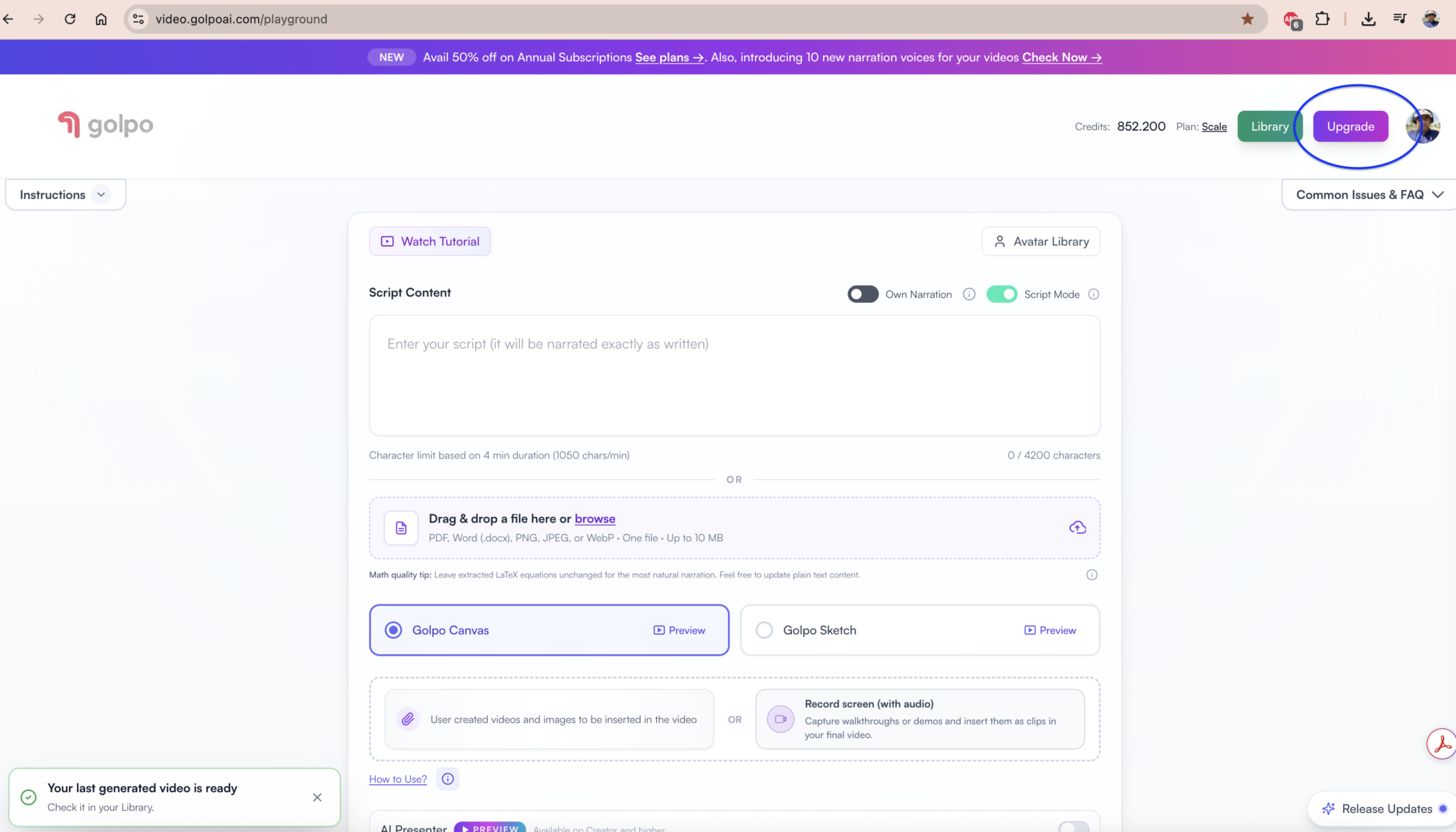
Sign in to the Golpo AI playground. In the top-right corner, click Upgrade, next to Library and your profile picture. The button is circled in the screenshot below.
Choose a plan to upgrade or downgrade
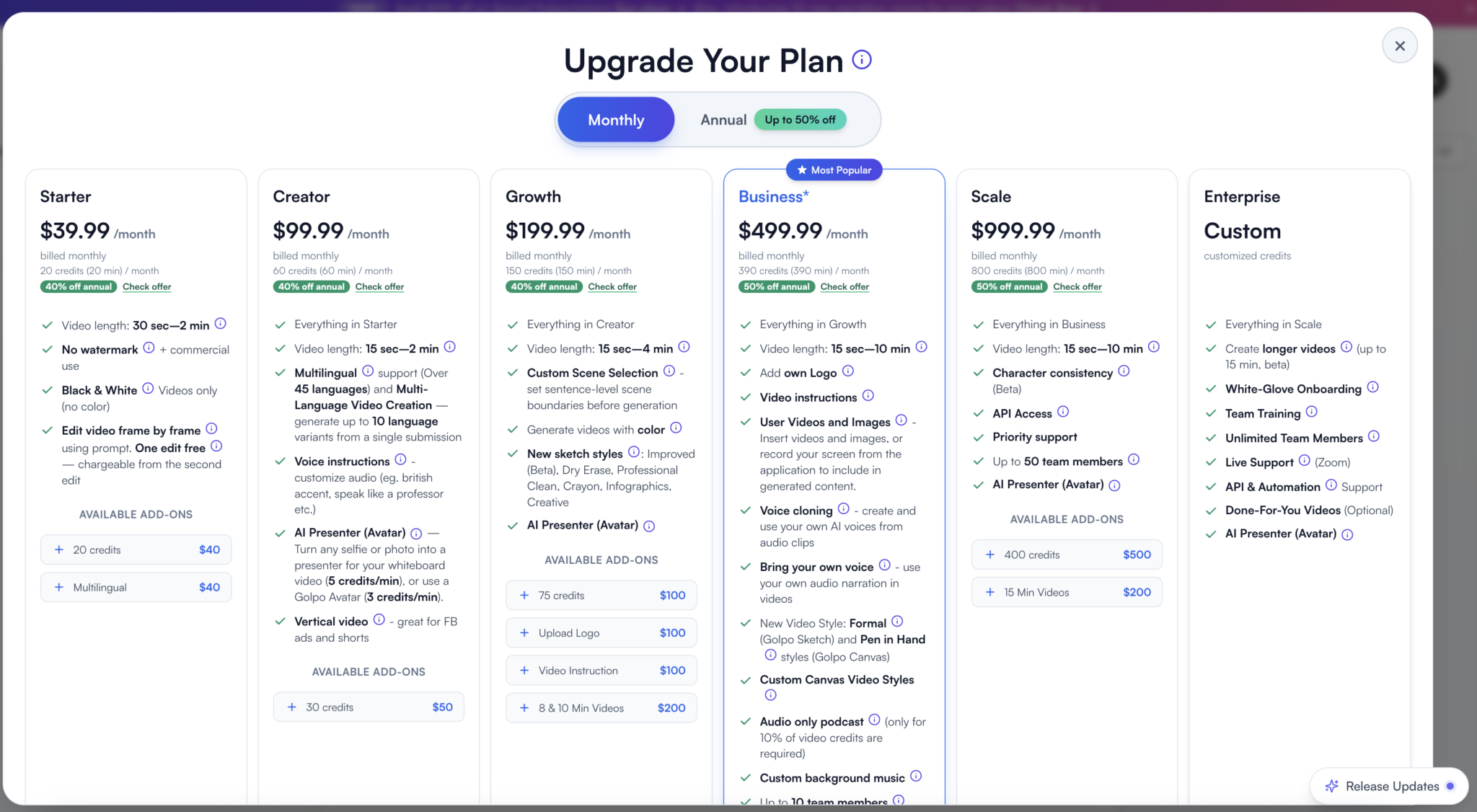
After you click Upgrade, the Upgrade Your Plan window shown below opens. You can upgrade to a higher plan or downgrade to a lower plan from this screen. Choose Monthly or Annual billing, compare the plans and available add-ons, then click Subscribe on the plan you want.
Watch the upgrade and downgrade walkthrough
Follow along with this video to see how to upgrade or downgrade your Golpo AI plan.
Watch How to upgrade or downgrade your Golpo AI Plan on YouTube.
How to upgrade your Golpo AI plan
- Sign in to Golpo AI. Use the account whose subscription you want to change.
- Click Upgrade in the top navigation to open the plan options.
- Choose your plan: Starter, Creator, Growth, Business, or Scale.
- Select Monthly or Annual billing. Review the included credits, features, and any add-ons you want.
- Click Subscribe. If you qualify for the two-day upgrade option, choose between Pay the difference only and Pay the full price. Otherwise, proceed through checkout for the new subscription.
- Review the amount and complete payment. After a successful payment, check your plan, credit balance, and renewal date in Manage Billing.
Use Upgrade for both upgrades and downgrades. You can select a lower-priced subscription through the same plan-selection flow.
Compare the two ways to change your plan
| Upgrade path | What you pay | Credits added | Billing cycle |
|---|---|---|---|
| Free to a paid plan | The selected subscription price | The new plan's included credits | Starts on the purchase date |
| Normal change between paid plans | The new subscription price | The new plan's full allowance, plus eligible unused credits carried over | Starts again on the change date |
| Eligible upgrade within the first two days using Pay the difference only | The difference charged for the higher plan | The difference between the two plans' credit allowances | Keeps the existing renewal date |
The special option requires an upgrade to a higher tier with the same billing frequency: monthly to monthly or annual to annual. Add-ons can affect eligibility. Check the upgrade options shown for your account before paying.
Choose the plan you want to upgrade to
These are the standard monthly subscription prices and credit allowances listed on the Golpo AI pricing page on October 24, 2026.
| Plan | Monthly subscription | Included credits per month | Features to consider |
|---|---|---|---|
| Starter | $39.99 | 20 | Black-and-white videos, downloads without a watermark, commercial use |
| Creator | $99.99 | 60 | Multilingual support, vertical video, voice instructions |
| Growth | $199.99 | 150 | Color videos, custom scene selection, videos up to four minutes |
| Business | $499.99 | 390 | Your own narration, branding, voice cloning, up to 10 team members |
| Scale | $999.99 | 800 | Included API access, priority support, up to 50 team members |
Choose by the features and production volume you need. If you need color, for example, compare Growth and higher plans. For a fuller feature comparison, read Golpo Pricing Explained.
Annual prices and promotions appear in plan selection. Review the total annual charge, credit allowance, and renewal terms before subscribing.
Upgrade from Free to your first paid plan
From your Free account, click Upgrade, select a paid plan, choose Monthly or Annual billing, and complete checkout.
If you choose monthly Growth at the standard listed price of $199.99, you receive 150 credits when payment succeeds. Your monthly subscription starts on the purchase date. An annual purchase starts an annual subscription instead.
For example, buying monthly Growth on October 24 starts that billing period on October 24. Check Manage Billing for the next scheduled renewal and the active subscription details.
Upgrade from Starter to Growth with unused credits
Suppose you are five days into a monthly Starter subscription and have 12 unused credits. You need color videos and decide to move to Growth.
Click Upgrade, select Growth, choose your billing frequency, and complete payment for the new subscription. With a normal switch to monthly Growth:
- Your Growth plan becomes active immediately.
- Your eligible unused Starter credits carry over.
- Your new Growth allowance of 150 credits is added.
- A new monthly billing cycle begins on the change date.
Your example balance is 12 carried-over credits + 150 new credits = 162 credits, assuming no credits are spent while the change is processing.
The previous Starter payment is not refunded. Golpo's upgrade policy describes eligible credit rollover and the new subscription term presented during checkout.
Upgrade within two days and pay only the difference
If you have just subscribed and need a higher tier, look for the special Pay the difference only option. It is available for eligible upgrades within the first two days of a new subscription.
- Click Upgrade and select a higher plan.
- Keep the same billing frequency as your current subscription.
- Click Subscribe on the higher plan.
- When the upgrade choice appears, review the approximate charge and additional credits.
- Choose Pay the difference only to complete that upgrade.
This path adds the difference in credits, rather than the higher plan's full allowance. Your current renewal date stays the same.
Example of upgrading Creator to Growth
At the standard monthly list prices:
| Calculation | Amount |
|---|---|
| Growth price minus Creator price | $199.99 − $99.99 = $100 |
| Growth allowance minus Creator allowance | 150 − 60 = 90 additional credits |
If you have 45 credits remaining when the upgrade succeeds, your example balance becomes 45 + 90 = 135 credits. You do not receive another full 150-credit allocation through this path.
If your Creator subscription began on October 24 and you use this option on October 25, your renewal date stays tied to the original subscription. The amount displayed for your account governs the charge; promotions and taxes can affect the final amount.
Why the special upgrade option may be unavailable
The option applies to eligible active paid subscriptions moving to a higher tier within the two-day window. It is not the path for a downgrade or a switch between monthly and annual billing. Existing or newly selected add-ons can also make it unavailable.
If you see Pay the full price, that option starts a new subscription and adds its full credit allowance, with eligible unused credits carried over. Review which path you are choosing before completing payment.
Downgrade from Business to Growth
To move to a lower-priced plan, click Upgrade and select the lower tier. Choose your billing frequency, review the features and add-ons, and complete the new subscription purchase.
In this normal plan-change flow, the lower plan starts immediately and begins a new billing cycle. Your eligible unused credits carry over, and the newly purchased plan's allowance is added. You do not need to cancel first to use this flow.
For example, switching from Business with 200 unused credits to monthly Growth with 150 credits gives you 350 credits, assuming no intervening usage.
Check the lower plan's feature access before buying. A carried-over credit balance does not mean every feature from your previous tier is included in the new subscription.
Switch between monthly and annual billing
Select Monthly or Annual when choosing your new subscription through Upgrade. A normal plan purchase starts a fresh billing term on the purchase date: one month for monthly billing or one year for annual billing.
The two-day difference-payment option requires the same billing frequency, so it does not cover a monthly-to-annual or annual-to-monthly switch. Review the full amount and renewal date for the subscription you select.
Find your renewal date and download invoices
- Click your profile picture in the top-right corner.
- Select Manage Billing to open your subscription details.
- Check your current plan and billing dates.
- Click Manage Billing again inside that window to open the billing portal and access your invoices.
After a plan change, use these details to confirm the active subscription and next renewal. Also check the credit balance in your dashboard.
Frequently asked questions
Will I lose my unused Golpo AI credits when I upgrade
Eligible unused credits carry over through the normal Upgrade flow. Your new subscription's included credits are added to that balance. Check the rollover details shown for your account when changing plans.
Does upgrading reset my billing date
A normal plan change starts a new billing cycle on the purchase date. An eligible two-day upgrade using Pay the difference only keeps your existing renewal date.
Do I pay the full price or just the difference
A normal plan change charges for the new subscription. Eligible upgrades to a higher tier within the first two days can offer Pay the difference only, provided the billing frequency stays the same and the subscription meets the eligibility requirements shown in the upgrade flow.
Can I downgrade my Golpo AI subscription
Yes. Click Upgrade, select a lower-priced plan, choose your billing frequency, and complete the new purchase. In that flow, the new plan begins immediately, eligible unused credits carry over, and the new plan's allowance is added.
Do I get a refund for my old plan
A normal upgrade does not refund the previous subscription payment. Eligible unused credits may roll over as described during the upgrade. See the current Golpo AI Terms of Service for the applicable policy.
Does the two-day upgrade add the full new plan allowance
No. Pay the difference only adds the difference between the two plans' credit allowances. For example, monthly Creator to monthly Growth adds 90 credits, because 150 minus 60 equals 90.
Will my add-ons automatically transfer
Review the add-ons included with your selected subscription before paying. Availability differs by plan, and add-ons can affect eligibility for the two-day difference-payment upgrade.
Where can I download my Golpo AI invoice
Open your profile menu, select Manage Billing, then click Manage Billing inside the subscription window to open the billing portal and access invoices.
What should I do if my new plan or credits do not appear
Refresh your account and check Manage Billing. If payment succeeded but your plan or credits still have not updated, contact support@golpoai.com with your account email, selected plan, and payment date. Include the invoice or receipt if available.
Upgrade your Golpo AI subscription
Open Golpo AI, click Upgrade, and choose your next plan. Before paying, check whether you are starting a new billing cycle or using the eligible two-day difference-payment option.
For more detail, visit these related guides:
- Golpo Pricing Explained for plan features, credits, and add-ons.
- How Credits Work on Golpo AI for generation and editing credit rules.
- Golpo AI Complete Tutorial for the dashboard and video creation workflow.
Tags


