Dreamina AI Turns One Prompt Into Images, Clips, and Avatars.

Dreamina, from the CapCut team, is great for AI images, short clips, and avatar videos. When the video has to teach something from a document, Golpo AI writes the narration and draws the scenes for you. Try Golpo AI for free!

0 / 18,500

Both tools use AI to make video, but they start in different places. Dreamina starts from a prompt or an image and gives you generated footage and avatars. Golpo starts from your material and gives you a narrated, illustrated explanation.

Pick Golpo AI if
You are turning a PDF, deck, SOP, or script into a lesson, a training video, or a walkthrough, and you want narration and visuals that match.
Pick Dreamina if
You want AI-generated images, short cinematic clips, or avatar videos, and plan to cut them together in the CapCut editor.

A Golpo video, in every look

Click a style to watch a real video made in Golpo. Dreamina clips are generated footage, while these are drawn scene by scene to match the narration.

EditorialGolpo Canvas · Polished, fully-illustrated scenes

Add a presenter and keep the lesson clear

Dreamina is known for avatars and lip-sync. Golpo gives you a presenter too, and then puts the explanation next to it.

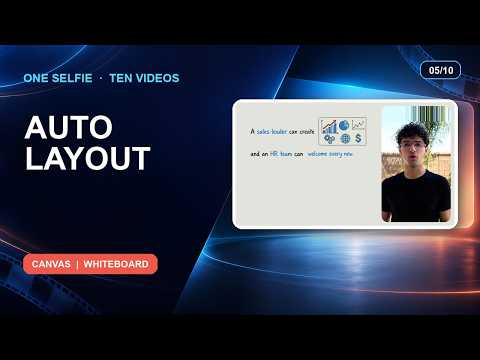
AI Presenter

A face on screen, with the diagram beside it

Turn a selfie or photo into a lip-synced presenter, or pick one of Golpo's ready-made avatars. The presenter appears next to the whiteboard visuals, so viewers get a person and the diagram together.

  • Your own photo, or a Golpo avatar
  • Side by side, top and bottom, round overlay or full screen
  • Available on Creator plans and above

Golpo Studio

Long videos in one go, not a stack of short clips

Studio is Golpo's general-purpose video model. It makes hand-drawn videos with purposeful motion, can match the style of a reference you give it, and keeps visuals consistent from start to finish.

  • Up to 60 minutes in one go
  • 45+ languages
  • Edit script, narration and timing after generation

Feature-by-Feature Comparison

Where each tool is stronger, based on what each is designed to do.

FeatureGolpo AIDreaminaBetter fit
Video styleWhiteboard and illustrated animationsGenerated clips, images, and avatar videosGolpo
Starting pointPDF, PPT, Docs, script, audio, or a promptText prompt, reference image, or avatar photoGolpo
NarrationWritten for you from the source and voiced in 45+ languagesText-to-speech and lip-sync you set up per clipGolpo
Video lengthOne narrated video up to an hour with StudioShort clips you stitch togetherGolpo
Cinematic footage and imagesIllustrated scenes, not live-action footageStrong image and short-clip generationDreamina
Editing after generationEdit scenes, script, and timing in placeFull timeline editing in the CapCut editorTie
Best forTraining, education, and explainersSocial clips, creative visuals, and avatarsGolpo

Strengths and Trade-offs

Golpo AI

Narrated whiteboard and illustrated explainers generated from documents, scripts, or a prompt.

Strengths

  • Starts from the PDF, deck, or SOP you already have
  • Narration and visuals are generated together
  • Edit scenes and components in place
  • Long-form videos in 45+ languages

Trade-offs

  • Not built for live-action style or cinematic footage

Dreamina AI (CapCut)

A creative AI studio for images, short video clips, and avatars, connected to the CapCut editor.

Strengths

  • Image and short-clip generation from a prompt
  • Avatar and lip-sync tools
  • Works with the CapCut editor you may already use
  • Good for fast, eye-catching social content

Trade-offs

  • A long lesson means generating and stitching many separate clips
  • Documents have to be turned into prompts or a script first

Best Tool for Each Use Case

If you are makingBetter fitWhy
Training and L&DGolpoVisual explanations generated from documents
Social clips and ReelsDreaminaFast generated footage plus CapCut editing
Classroom lessonsGolpoWhiteboard animation keeps concepts clear
SOP and process videosGolpoDocument-to-video automation
Creative visuals and mood piecesDreaminaGenerated images and cinematic clips
Product walkthroughsGolpoDocs, screenshots, and diagrams in one narrated video

Dreamina vs Golpo AI: Frequently Asked Questions

OverviewIs Golpo AI a good Dreamina alternative?

It is a good alternative when the goal is to explain something, such as training, onboarding, or a lesson. Golpo AI generates narrated whiteboard explainers from documents. If you mainly want generated images and cinematic clips, Dreamina is the closer fit.

CapCutDo I still need CapCut with Golpo AI?

Not for the video itself. Golpo AI produces a finished, narrated video and lets you edit scenes, script, and timing inside the same project. You can still export it and use any editor you like for extra polish.

DocumentsCan I turn a PDF or PowerPoint into a video?

Yes. Upload a PDF, PowerPoint, or Google Doc and Golpo AI extracts the key points, writes the narration, and builds the scenes. Dreamina starts from prompts and images, so you would write the prompt or script first.

AvatarsDoes Golpo AI have AI avatars?

Yes. On Creator plans and above you can add an AI Presenter made from a selfie or photo, or pick a Golpo Avatar, and show it beside the whiteboard explanation.

LengthCan Golpo AI make long videos?

Yes. Golpo AI produces a single narrated, sequenced video, and Studio can run up to 60 minutes. Generative clip tools typically produce short clips, so a long video usually means stitching many together.

PricingHow does pricing compare?

Golpo AI Starter is $39.99 per month with 20 monthly credits and no watermark. Dreamina uses a credit system and its plans and free daily credits change over time, so check its pricing page for current details.

Make Your Next Video anExplainer, Not Just a Clip

Start with a document and get a narrated whiteboard explainer in minutes.