InVideo Turns Ideas Into Videos.

InVideo gives you templates, stock footage, and a timeline, and it is a strong choice for ads and social content. When the job is turning a document into a training or explainer video, Golpo does the assembly for you. Try Golpo AI for free!

0 / 18,500

Why Teams Move Away From InVideo

InVideo is a strong editor for marketing content. These are the friction points that come up when the goal is training or explanation.

Every video takes editing time
AI assists the first draft, but you still arrange footage, trim scenes, and tune the timeline by hand.
Documents are not the starting point
Text and URL input work, but turning a PDF or SOP into a structured video takes extra steps.
Stock footage does not explain
Generic footage can illustrate a mood but rarely shows how a process or concept actually works.
Updates mean rebuilding
When a policy or product changes, you reopen the project and re-edit the affected scenes manually.

Same Video, Two Workflows

What it takes to make one training explainer from a source document.

StepIn InVideoIn Golpo
StartWrite or paste a script, or pick a templateUpload the PDF, deck, or doc, or paste a prompt
Script and narrationReview the generated script and choose a voiceoverGolpo extracts the key points and writes the narration
VisualsSearch the stock library and match footage to each lineIllustrated scenes are generated and tied to the narration
EditingTimeline edits for timing, trims, and transitionsEdit any scene or component in place
OutputExport in the aspect ratio you set upExport 16:9 or 9:16, in 45+ narration languages
Typical time to a first draft in Golpo
2-5 min
Narration languages
45+
Maximum video length
30+ min

More than a whiteboard

Stock footage can't give you a presenter who is yours, or a character that stays the same from one video to the next. These can.

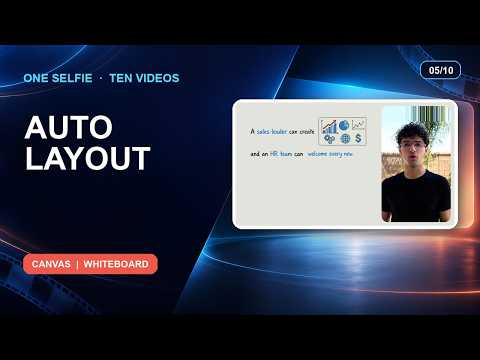
AI Presenter

Put a face on your explainer

Turn a selfie or photo into a lip-synced presenter, or pick one of Golpo's ready-made avatars. The presenter appears next to the whiteboard visuals, so viewers get a person and the diagram together.

  • Your own photo, or a Golpo avatar
  • Auto, side by side, top and bottom, round overlay or full screen
  • Landscape for the web, vertical for Shorts and Reels
  • Available on Creator plans and above
Character consistency

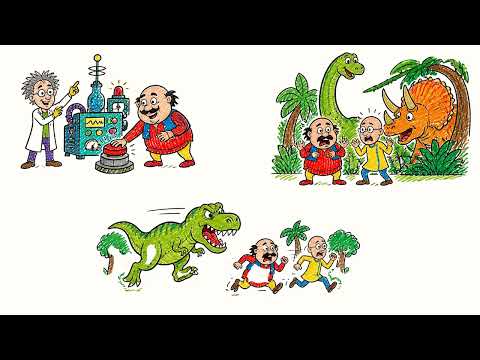
The same character, video after video

Add yourself or your own character and keep the look consistent across a whole series. It is how a channel or training library ends up feeling like one brand instead of a pile of one-off clips.

  • Add yourself or your own character
  • One recognisable look across every video
  • Built for channels, courses and branded series

Golpo Studio

Motion videos on any topic, up to an hour long

Studio is Golpo's general-purpose video model. It makes hand-drawn videos with purposeful motion, can match the style of a reference you give it, and keeps visuals consistent from start to finish.

  • Up to 60 minutes in one go
  • 45+ languages
  • Edit script, narration and timing after generation

What Carries Over

Most of what you used InVideo for has a direct equivalent.

In InVideoIn GolpoNote
Text or URL to videoPrompt, script, or document to videoAlso accepts PDF, PPT, Docs, and audio
Stock footage libraryGenerated illustrated scenes10+ visual styles
AI voiceoverBuilt-in narration45+ languages
Timeline editorScene and component editingChange one scene without redoing the rest
Social aspect ratios16:9 and 9:16 exportPick the frame before you generate

Move Over in Four Steps

  1. 1.

    Pick one video to move

    Choose a training or explainer video you already made, ideally one with a source document behind it.

    5 min
  2. 2.

    Upload the source

    Add the original PDF, slides, or script. Pick a style and a narration language.

    2 min
  3. 3.

    Review the first draft

    Check the script and scenes against your source, then edit any scene that needs a change.

    10 min
  4. 4.

    Export and compare

    Export in your frame size and compare it with the InVideo version before moving more videos.

    5 min

When to Stay With InVideo

  • Your content is social media promos and ads built around stock footage
  • You want hands-on, frame-level control over a timeline
  • Your videos are not based on documents, scripts, or procedures

Switching From InVideo: Frequently Asked Questions

OverviewIs Golpo AI a good alternative to InVideo?

For training, education, and explainers, yes. Golpo AI generates the whole narrated video from a document or prompt with minimal editing. For promos and social content built on stock footage and templates, InVideo is the stronger fit.

VisualsDoes Golpo AI use stock footage?

No. Golpo AI generates custom whiteboard and illustrated scenes for each video, so there is no stock library to search and the visuals are tied to the narration.

TimeHow long does it take to make a video?

A first draft in Golpo AI typically takes a few minutes. Total time depends on the length of the video, the source, and how much you edit afterward.

DocumentsCan I bring my existing script or PDF?

Yes. You can paste your script, or upload a PDF, PowerPoint, Google Doc, or audio recording, and Golpo AI builds the narration and scenes from it.

PricingWhat does Golpo AI cost?

There is a free 1-minute watermarked preview with no credit card. Paid plans start at $39.99 per month. See the pricing page for current plans.

Make Your First Explainer in Minutes, Not Hours

Bring a document you already have and see the first draft for yourself.