Generate On-Screen Text Using Only Your Script in Golpo
Keep every generated on-screen word inside your approved script. See four API-generated Canvas and Sketch examples made with the exact same script, learn where to enable the control, and copy a working API v2 payload.

Golpo feature guide
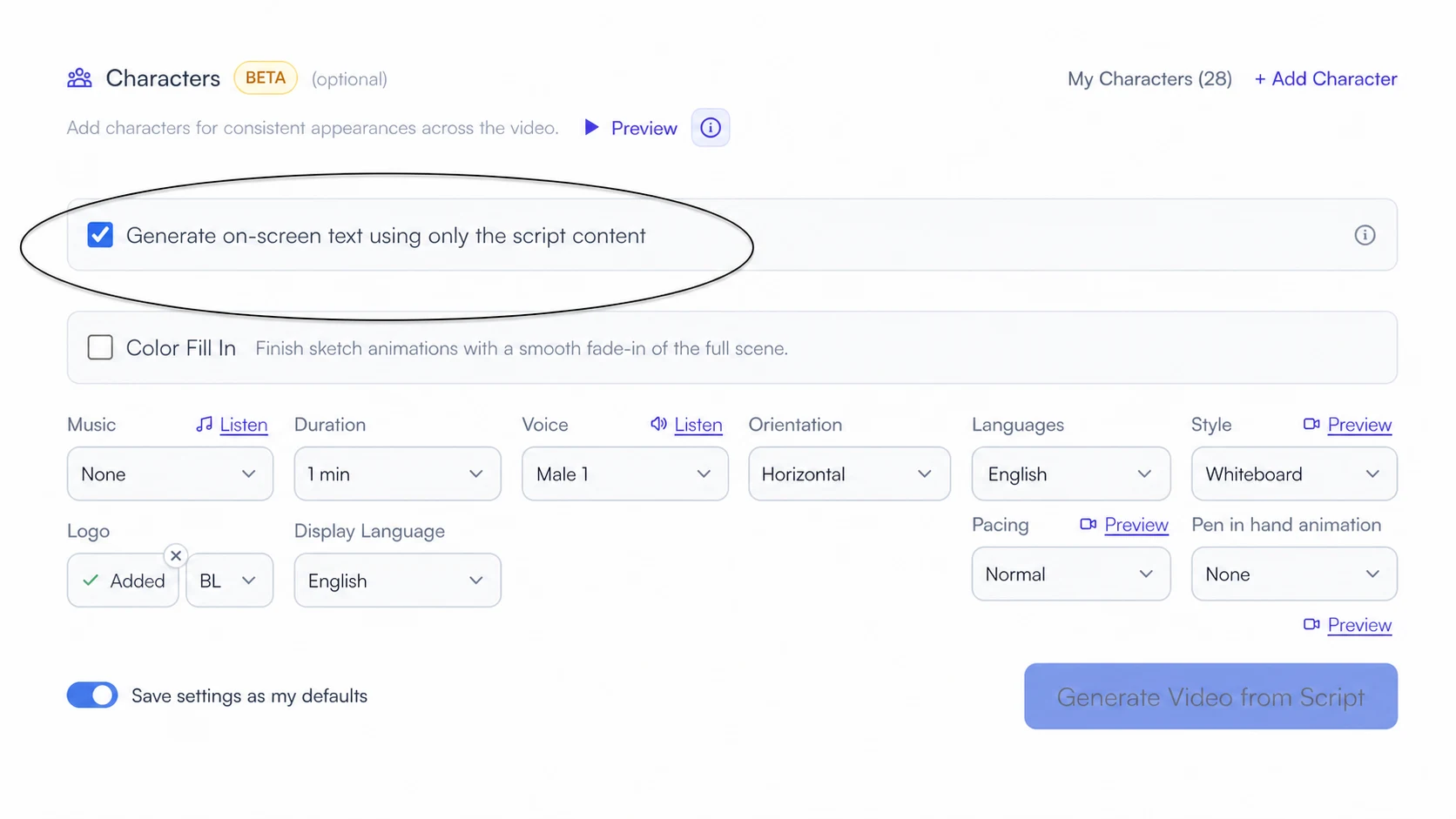
Use only your script for on-screen text
The short answer: keep Generate on-screen text using only the script content enabled when every generated word visible in the video must already exist in your supplied script. Golpo can still choose which script phrases to show, but it will not invent extra labels, captions, titles, or other wording.
Updated August 20, 2026 · Four controlled API v2 renders

The exact script used in all four tests
To isolate the control, all four API requests used the same prompt, script, duration, voice, language, orientation, and fast scene pacing. Only the engine/style and onscreen_text_from_script_only value changed.
Small ideas become clear when we remove distraction. Start with one question, connect each step, and let every visual support the message. When the screen shows only words from this script, viewers can focus on the explanation.
See the controls held constant
Prompt: Create a concise visual explainer about turning complex ideas into clear stories.
Timing: 0.25 minutes
Voice: female-1
Narration language: English
Orientation: horizontal
Scene pacing: fast
Watermark: false
Visibility: public
Canvas: the difference is visible
The enabled Canvas video uses phrases found in the script, including “Small ideas become clear,” “Start with one question,” and “only words from this script.” The disabled video adds diagram labels that do not appear in the script: IDEA, PROCESS, OUTCOME, GROWTH, and INSIGHTS FOUND.
Canvas · flag on
Only script words are allowed
API: onscreen_text_from_script_only: true · open MP4
Canvas · flag off
Golpo may add scene labels
API: onscreen_text_from_script_only: false · open MP4
Sketch: Professional Clean on vs Classic with Words off
This pair makes the boundary immediately visible. The Professional Clean video keeps the flag on and displays readable phrases taken directly from the script. The flag-off Classic-with-Words treatment adds prominent labels such as CLARITY, CLEAR IDEA, SCRIPT ONLY, and FOCUS—words that were never supplied in the narration.
Sketch Professional Clean · flag on
Readable phrases, strict vocabulary
API: onscreen_text_from_script_only: true · open MP4
Sketch Classic with Words treatment · flag off
Large labels beyond the script
API v1: flag omitted/default off · Classic plus word-label visual instruction · open MP4
How to enable it in Golpo
- Start a script workflow. The control normally appears when you select Script Only mode or Edit script before creating video.
- Paste or approve the exact narration. Treat the script as the allowed vocabulary for generated display text.
- Leave the checkbox selected. In the creation interface it is checked by default.
- Generate and verify. Compare every readable word in the finished frames with the approved script, especially names, dates, claims, and regulated wording.
API v2 payload
In API workflows, set the boolean explicitly. Unlike the checked creation-interface control, the API field should not be left to an assumed default.
POST https://api.golpoai.com/api/v2/videos/generate
x-api-key: YOUR_API_KEY
Content-Type: application/json

{
  "prompt": "Create a concise visual explainer about turning complex ideas into clear stories.",
  "custom_script": "Small ideas become clear when we remove distraction. Start with one question, connect each step, and let every visual support the message. When the screen shows only words from this script, viewers can focus on the explanation.",
  "onscreen_text_from_script_only": true,
  "golpo_video_engine": "golpo_canvas",
  "canvas_style_variant": "editorial",
  "timing": "0.25",
  "narration_voice": "female-1",
  "narration_language": "english",
  "video_orientation": "horizontal",
  "scene_pacing": "fast",
  "watermark": false,
  "visibility": "public"
}
For the flag-on Sketch test, v2 used "golpo_video_engine": "golpo_sketch", "sketch_style_variant": "professional_clean", and "onscreen_text_from_script_only": true. For the flag-off treatment, v1 used Classic ("use_lineart_2_style": "false") plus the visual instruction “include a few large key words and short labels in every scene.”
When to keep it on—or turn it off
| Keep it on | Consider turning it off |
|---|---|
| Approved product, policy, legal, medical, financial, or compliance wording | Creative explainers where short generated labels improve a diagram |
| Translated scripts with reviewed terminology | Early drafts where Golpo can propose titles and annotations |
| Brand language that must not drift | Scenes that benefit from concise category, process, or chart labels |
Frequently asked questions
Is this the same as captions?
No. The feature restricts text generated inside the visual scenes. It does not promise a full, timed accessibility caption track or transcript.
Will every word from my script appear?
No. It is an allowed-vocabulary boundary, not a requirement to display the complete narration. A scene can show one script phrase, several script words, or no readable text.
Does turning it off always create extra words?
No. Turning the flag off gives the visual generator permission; the scene design still determines whether text is useful. In the Classic treatment above, explicit visual direction encouraged large labels so the difference would be easy to inspect.
Does it rewrite my script?
No. This setting governs generated on-screen text. Use Script Only mode, Edit script before creating video, or API custom_script to control the narration source.
Tags


