Golpo Prompt Mode vs Script Mode: The Complete Guide
Compare two real two-minute Golpo videos made from the same topic: one written by Golpo from a prompt and one using a 1,785-character ChatGPT script as the exact narration. Learn duration-based character limits, display-text controls, and the pre-render script review.

Golpo workflow guide
Prompt Mode vs Script Mode in Golpo AI
The short answer: use Prompt Mode when you want Golpo to research the topic and write the video script. Use Script Mode when the words are already written and must become the audio as supplied. Select Edit script before creating video to review the narration before Golpo renders the video.
Sudip Kar · Updated September 24, 2026 · About 8 minutes

The loop uses real Golpo UI captures and real finished Golpo videos. It is silent; the labels explain each transition.
Prompt Mode vs Script Mode at a glance
| Question | Prompt Mode | Script Mode |
|---|---|---|
| Who writes the narration? | Golpo researches the topic or source material, then drafts it. | You provide the finished narration. |
| What goes in the main box? | Topic, audience, outcome, required points, sources, limits, and CTA. | Spoken words only. Do not paste production notes you do not want narrated. |
| Best for | Exploration, explainers, first drafts, research-led topics, and fast ideation. | Approved copy, legal or policy wording, translations, quotations, product claims, and branded voice. |
| Level of narration control | Lower: Golpo chooses the research, wording, order, and transitions. That unpredictability can occasionally produce something unexpectedly excellent. | High: the supplied script becomes the narration as written. |
| Main risk | A vague prompt gives Golpo too much room to infer. | Directions such as “show a chart” may be spoken aloud if placed in narration. |
How to use Prompt Mode
Prompt Mode is the default. Leave Script Mode off, then tell Golpo what the video should teach or accomplish. Golpo researches the subject, develops the narrative structure, writes the script, generates the voice, and builds the visuals. You do not have full control over the final narration: Golpo may choose facts, phrasing, order, and transitions you did not specify. That is the tradeoff—and sometimes the creative freedom lets Golpo produce a surprisingly magical explanation you would not have written yourself.
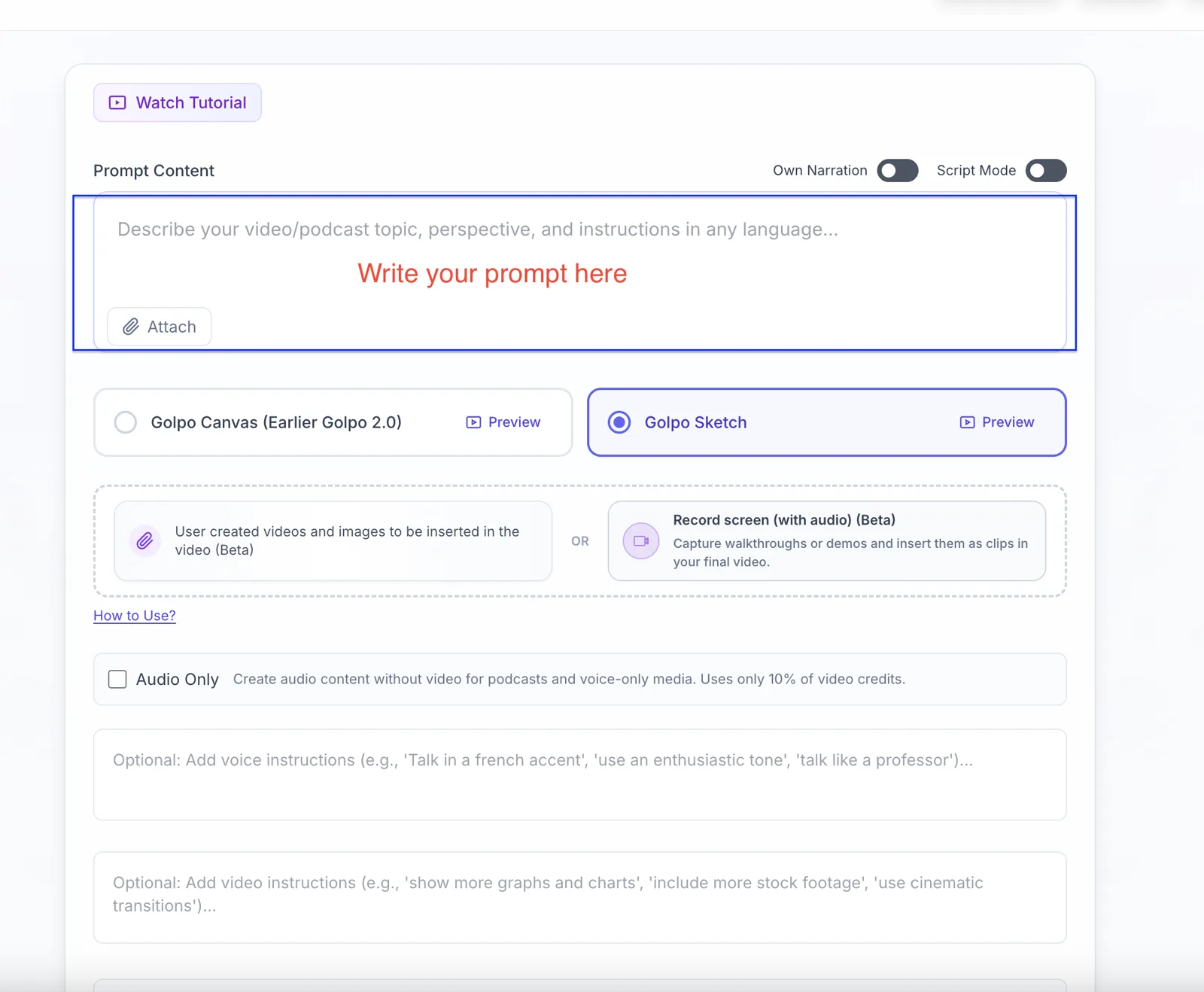
- Define the audience. “New managers” is more useful than “everyone.”
- Name the outcome. Say what the viewer should understand or do afterward.
- Give Golpo a spine. Add the must-cover points, preferred order, source material, and what to avoid.
- Keep packaging in the controls. Choose duration, language, orientation, engine, style, and voice separately.
- Use the review checkbox. Approve the generated narration before rendering if accuracy matters.
Prompt formula
Create a [duration] video for [audience] that helps them [outcome]. Cover [point 1], [point 2], and [point 3]. Use [source] as the source of truth. Do not [prohibition]. End with [CTA].
How to use Script Mode
Turn on Script Mode when the narration is already approved. The words you paste are the audio as-is in the video; Golpo creates the scenes around those words. Put visual direction in Video Instructions, not inside the narration box.
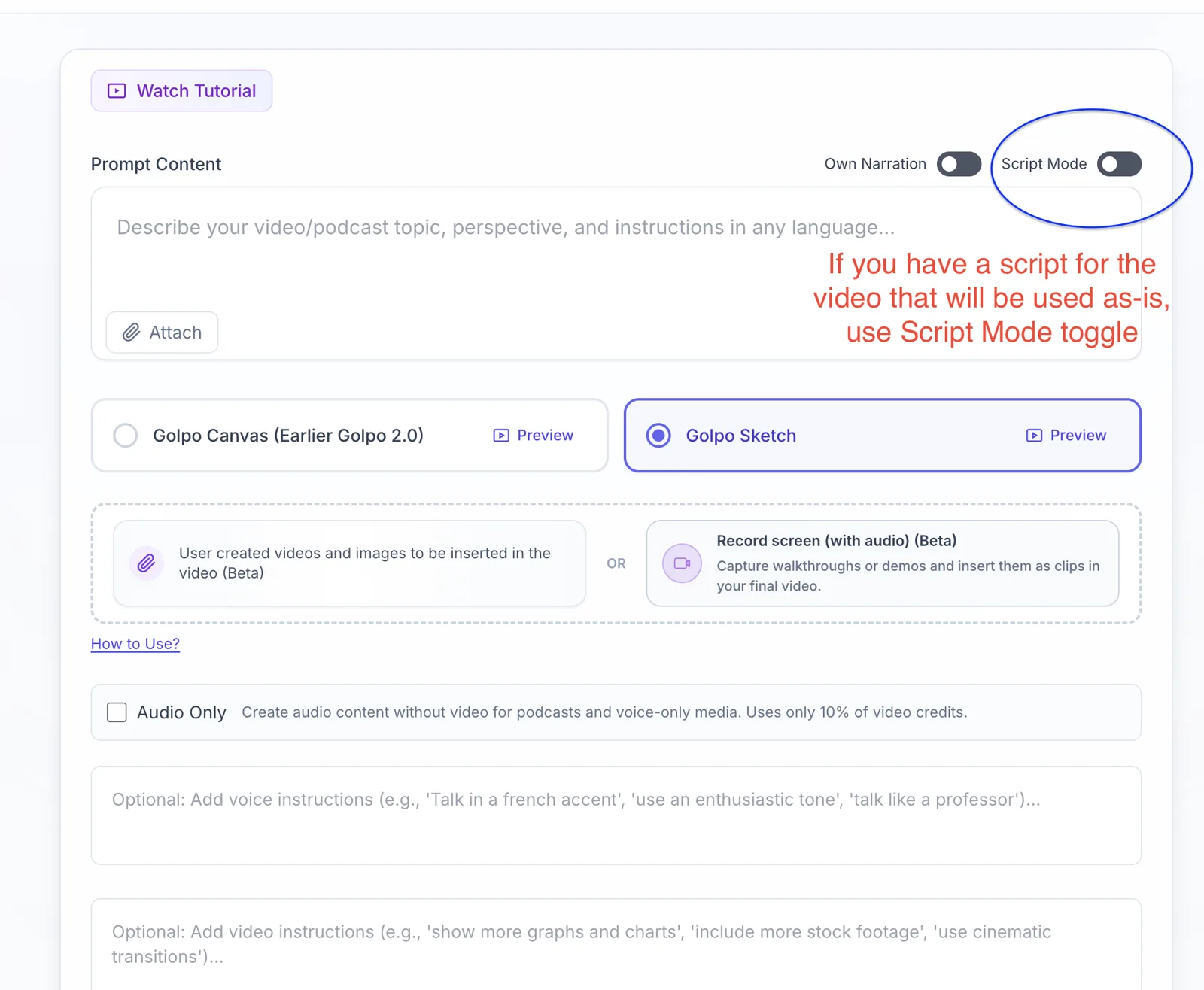
- Choose duration first. The script allowance changes with the selected length.
- Turn on Script Mode. The main input now represents supplied narration.
- Paste only what should be spoken. Remove headings, timestamps, camera notes, and bracketed production directions unless they are meant to be read.
- Add visual direction separately. Use Video Instructions for diagrams, colors, pacing, recurring characters, or scene treatment.
- Read it aloud once. Fix tongue-twisters, long sentences, abbreviations, and numbers before generating.
The Script Mode character limit follows duration
Select the duration before writing or pasting the script. Golpo then shows the maximum number of characters allowed in Script Mode. The working allowance is approximately 1,050 characters per selected minute, including spaces and punctuation. It is a character limit, not a word limit.
| Selected duration | Script Mode limit | Calculation |
|---|---|---|
| 2 minutes | 2,100 characters | 2 × 1,050 |
| 4 minutes | 4,200 characters | 4 × 1,050 |
For example, if the interface is set to two minutes, the Script Mode field shows a 2,100-character allowance. Change the duration below from two minutes to four minutes and the allowance changes from 2,100 to 4,200 characters. If your draft is too long, shorten it or select a longer duration before creating the video. The counter is an input limit—not a promise that every voice and punctuation pattern will land at exactly the same runtime.
“Edit script before creating video”
Script Mode tells Golpo that your supplied text is the narration. Edit script before creating video is the checkbox that activates the review step. With the checkbox off, Golpo can move from input to rendered video in one run. With it on, Golpo prepares the narration first and pauses so you can edit and approve it before video generation.
What to validate before you click Create Video
- Names, titles, dates, prices, quantities, units, and URLs
- Product, policy, medical, legal, financial, or safety claims
- Pronunciation and expansion of acronyms
- Transitions, repetition, pacing, and the final call to action
- Anything Golpo researched that must be compared with an authoritative source
Two matched two-minute-setting videos—and a validation example
Both examples were generated through the Golpo API with the same timing=2, 16:9 orientation, English voice, and Canvas Editorial style. The Prompt Mode output runs 2:08 and the Script Mode output runs 2:16 because narration and natural voice pacing affect the rendered runtime. The meaningful comparison is who controlled the words.
Example 1 · Prompt Mode
Bioluminescence with Golpo in the writer’s seat
This is a real Golpo API generation using the two-minute setting. Only the topic, audience, outcome, and broad coverage were supplied. Golpo researched and wrote the narration.
Create a visually imaginative two-minute explainer about why some oceans glow at night. Research bioluminescence, explain the chemistry and ecological purpose accurately for a general audience, and build a memorable narrative with surprising examples and strong visual metaphors. Golpo may choose the structure and narration.
Control tradeoff: the creator does not control every narrated sentence. Golpo chooses the facts, order, metaphors, and transitions. The result may differ from what you pictured—but sometimes that freedom is exactly where Golpo does magic.
Real API output: Open the two-minute Prompt Mode video →
Example 2 · Script Mode
The same topic with creator-controlled narration
For the matched Script Mode generation using the same two-minute setting, ChatGPT wrote a 1,785-character narration—315 characters below Golpo’s 2,100-character limit. That complete script was supplied to the Golpo API, so the spoken wording was controlled from beginning to end.
Read the complete ChatGPT-authored narration
At night, some coastlines seem to hold a second sky. Every breaking wave flashes electric blue, and every footprint leaves a brief trail of light. This is bioluminescence: light made by living organisms. In many glowing bays, the light comes from microscopic plankton called dinoflagellates. Inside each cell, a molecule called luciferin reacts with oxygen. An enzyme, luciferase, helps the reaction happen quickly. The result is cold light, which means very little energy is wasted as heat. The glow is not simply decoration. For a tiny plankton cell, a flash can be an alarm. When a fish or paddle disturbs the water, thousands of cells light at once. That sudden brightness may startle the attacker. It can also reveal the attacker to a larger predator—a strategy scientists sometimes call a burglar alarm. Bioluminescence appears far beyond the shoreline. Fireflies use controlled flashes to find mates. Some fungi glow continuously. In the deep ocean, where sunlight disappears, animals use light to hunt, hide, communicate, and escape. An anglerfish carries a glowing lure. Some squid release luminous clouds that work like underwater smoke screens. The colors are shaped by the environment. Blue travels efficiently through seawater, so marine bioluminescence is usually blue or blue-green. On land, fireflies often glow yellow or green. If you visit a glowing beach, protect the phenomenon you came to see. Avoid touching wildlife, do not collect glowing organisms, and follow local rules. Dark nights, calm water, and low light pollution usually produce the best view. So when the sea sparks beneath your hand, you are watching chemistry become communication. A single flash lasts only a moment, but together, millions of living lights can transform an entire shoreline.
Control advantage: Golpo builds visuals around the supplied narration without taking over the writing. Select Generate on-screen text using only the script content for additional control over displayed wording.
Real API output: Open the two-minute Script Mode video →
Example 3 · Prompt Mode + script review
Research and draft first, then approve every claim
This is the best middle path when you want Golpo to do the first-draft work but a human must approve the narration.
Use the attached employee benefits policy as the source of truth. Create a two-minute orientation for new US employees. Explain eligibility, the enrollment deadline, the three steps required to enroll, and where to get help. Do not invent coverage details or deadlines that are not in the document. End by telling employees to confirm their choices in the benefits portal.
Configuration: Script Mode off; Edit script before creating video on. Compare every date, benefit, and instruction with the policy before approving the script.
The five-second decision rule
Choose Prompt Mode if
You can say, “Here is the topic and outcome—help me research, structure, and write it.”
Choose Script Mode if
You can say, “These are the words. Please turn them into a visual video without rewriting them.”
Common mistakes
- Pasting a topic into Script Mode. Golpo will treat the topic sentence as the narration instead of expanding it into a full script.
- Pasting a finished script into Prompt Mode. Golpo may research, reorganize, or rewrite words you wanted preserved.
- Mixing visuals with narration. Put visual instructions in their own field so “show a bar chart” does not become spoken audio.
- Skipping the review gate for consequential content. Generated scripts still require human verification.
- Writing before choosing duration. Select the duration first and respect the character allowance shown in the interface.
Frequently asked questions
Can I start in Prompt Mode and still control the final script?
Yes. Select Edit script before creating video. Golpo drafts the narration, pauses, and lets you edit it before the video render begins.
Does Script Mode control the visuals too?
The script controls what is spoken and gives Golpo semantic clues for scenes. Use Video Instructions, style controls, and inserted assets for explicit visual direction.
How many characters can I paste into Script Mode?
About 1,050 characters per selected minute, including spaces and punctuation. Two minutes shows a 2,100-character limit; changing the duration to four minutes changes it to 4,200 characters. Choose duration before finalizing the script.
How can I control the words displayed on screen?
Select Generate on-screen text using only the script content. Golpo will derive generated display text only from your supplied script, giving you more control over visible wording as well as narration.
What if I already recorded the narration?
Use Own Narration instead. Script Mode is for written narration; Own Narration is for an audio file or recording.
Where can I get more prompt and script examples?
Use the Golpo Prompt Cheatsheet for prompt patterns and the Script-to-Video Guide for supplied-narration examples.
Ready to create the video?
Start with one sentence: “Golpo should write this,” or “These exact words should be spoken.” Then choose the matching mode.
Open Golpo →Tags


