How Sales Teams Close Deals Faster With Personalized Video
Your sales team has product manuals, demo recordings, and executive speeches sitting in shared drives collecting dust. Golpo AI turns all of it — documents, screen recordings, audio, and live narration — into polished explainer videos your reps can personalize and send to prospects in minutes. Here is how to use Golpo for sales enablement from day one.

Personalize sales videos with Picture in Picture
A rep or marketer can record a personal introduction, remain visible beside the animated explanation, and choose a round overlay or split-screen layout. See the complete Picture-in-Picture workflow →
Your company already has everything it needs to arm a sales team with powerful video content. Product manuals. Feature documentation. Screen recordings of the product in action. Executive keynotes and internal all-hands talks. The problem is none of it is in a format that a prospect will sit through — or that a rep can send in a cold outreach email and expect a reply.
Golpo AI changes that. It takes the raw material your company already produces — documents, recordings, live narration, even a quick prompt — and turns it into short, professional explainer videos that sales teams can use immediately. No video editor. No production queue. No waiting three weeks for marketing to get to it.
This is not about replacing your marketing team. It is about giving your sales team the ability to move at the speed of the deal.
Peter Kazanjy, founder of TalentBin (acquired by Monster Worldwide) and author of Founding Sales: The Early Stage Go-to-Market Handbook, puts it bluntly:
"There's a more advanced cousin of the video overview known as an 'explainer video.' This is typically a more abstract presentation of the sales narrative, oftentimes animated and voiced-over and made with a higher level of production value. I find that these videos are very helpful both as a first explanation for prospects who show up on your website and as an excellent piece of collateral to deploy via prospecting email."
Kazanjy goes on to describe how at TalentBin, he and his co-founder worked with a professional vendor to produce their first explainer video — finalizing edits while driving from San Francisco to Las Vegas for a trade show. They used that video and variations of it for four years. But his key insight is even more relevant today: "We would have had a much harder time getting those first couple dozen customers with our early product narrative if I hadn't had videos to send to local recruiting leaders in San Francisco. And if we hadn't been able to get those first few customers, we would never have had the opportunity to expand our product narrative."
His advice? "Don't gate a 'good enough' video on perfection." Something is better than nothing — get a video out the door while you work toward your polished masterpiece.
When Kazanjy wrote that, creating an explainer video meant hiring a vendor, managing a production timeline, and spending thousands of dollars. Today, Golpo AI lets any sales team produce that same caliber of animated, narrated explainer video in minutes — not weeks. The barrier Kazanjy describes is gone.
Three Ways Sales Teams Create Videos With Golpo
Golpo gives you multiple paths to video depending on what you already have. Every sales organization will find at least one of these workflows fits right into their existing process.
1. Turn Existing Documents Into Sales Videos
Every company has a library of sales collateral: product one-pagers, feature comparison sheets, solution briefs, case studies, technical white papers. These documents contain the substance your reps need to communicate — but prospects rarely read attachments.
With Golpo, you upload the document directly and get back a narrated, animated explainer video that covers the same ground in three to five minutes. The AI reads the document, builds a script, generates visuals, and adds professional narration — all automatically.
Here is what the process looks like. You write a prompt describing your video topic and perspective, or simply attach your existing document using the Attach button. Golpo handles the rest.
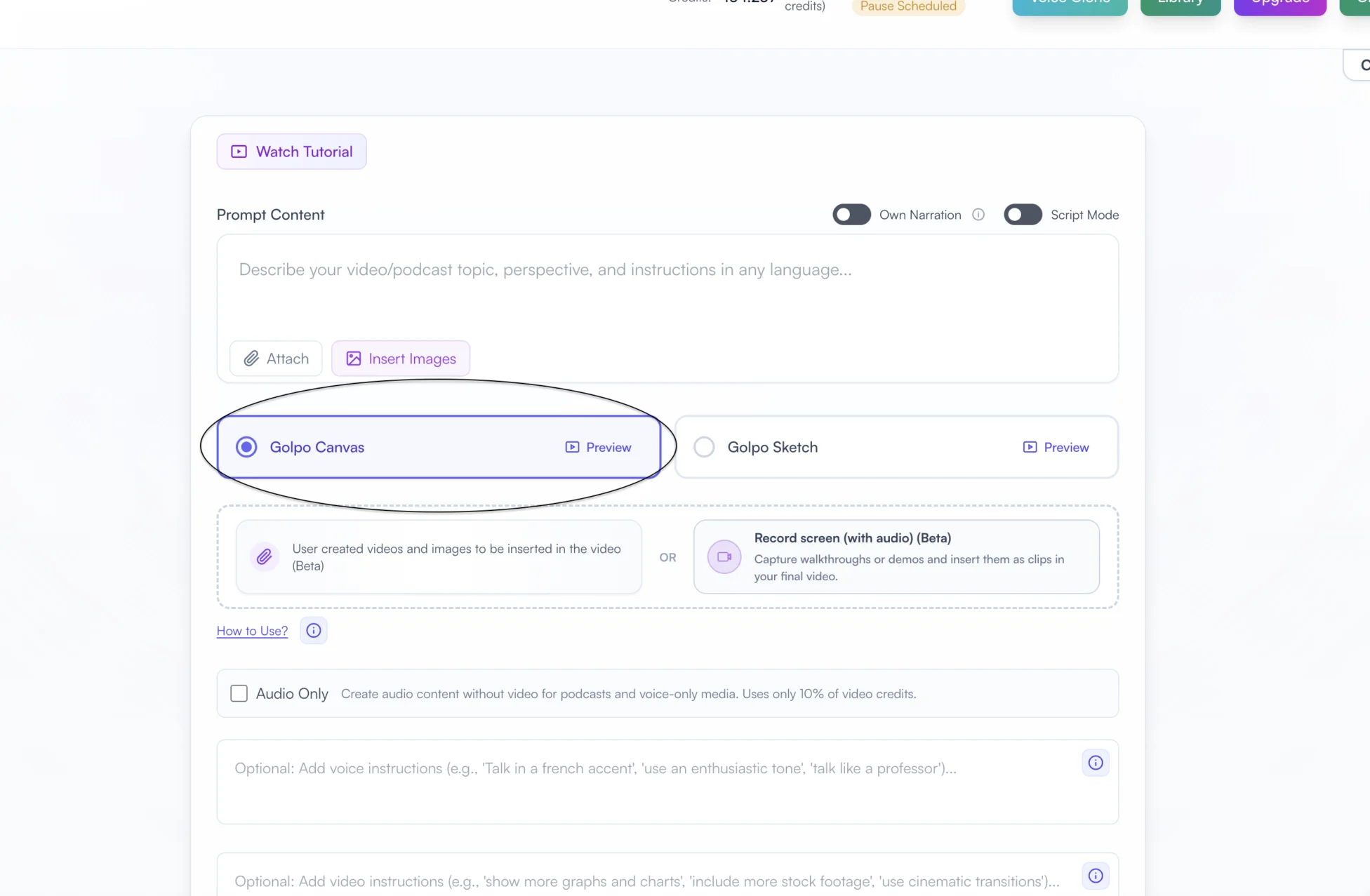
This works for:
- Product overview videos built from your product brochure or feature sheet
- Case study walkthroughs generated from written customer success stories
- Competitive battle cards turned into quick comparison videos reps can share before a decision meeting
- Technical explainers from white papers or solution architecture documents
The output is a polished video your rep can drop into an email, embed in a sales deck, or share in a LinkedIn message. The prospect gets a three-minute video instead of a ten-page PDF — and they actually watch it.
Here is an example of a product style explainer — the kind of video a sales team can generate from existing company material and send directly to prospects:
And here is a general product overview video — the type of video that a rep can customize for a specific prospect's industry or use case by adjusting the prompt or attaching relevant assets:
These are not templates you are locked into. Change the prompt, swap the assets, adjust the focus — and Golpo generates a new version tailored to the next prospect. That is the difference between a static marketing asset and a sales tool.
2. Create Product Demos From Screen Recordings or Manuals
Product demos are the backbone of B2B sales. But recording, editing, and narrating a good demo takes time — and by the time it is done, the UI may have already changed. Golpo gives sales teams two ways to create product demo videos fast.
Option A: Screen record directly in Golpo. Use Record screen (with audio) to capture a walkthrough or demo and insert the recording as clips in the final video.
This is ideal for:
- Recording a quick walkthrough of a feature you know the prospect cares about
- Capturing a live demo and letting Golpo polish it into something shareable
- Building a library of feature-specific clips that reps can mix and match
Option B: Upload existing product assets. If you already have product screenshots, short demo clips, or product manual PDFs, upload them directly. Golpo weaves your assets into the video alongside its own generated visuals.
This means your sales enablement team can build a master set of product screenshots and video clips, and any rep can generate a custom demo video from those assets in minutes — without touching a video editor.
Here is a real example: a feature-specific explainer video for the Golpo API — the kind of targeted, technical video a sales engineer might send to a prospect evaluating integration capabilities:
This is exactly the type of video Kazanjy describes — an animated, narrated explainer that works both on your website and as collateral in a prospecting email. The difference is that this one was made with Golpo in minutes, not weeks with an outside vendor.
The key advantage for sales: you control exactly which features and selling points appear in the video. Highlight the three capabilities that matter most to this prospect. Skip everything else. That level of relevance is what turns a generic demo into a deal-closing touchpoint.
3. Turn Executive Speeches Into Sales Content
Your CEO's keynote at the last industry conference. The CTO's internal deep-dive on the product roadmap. The CMO's vision talk at the company all-hands. These are high-value assets that contain compelling narratives about your product, your market, and your company's direction — exactly the kind of content that builds trust with prospects.
But a forty-five-minute conference recording is not something you can drop into a prospecting email. Golpo solves this with the Own Narration toggle.
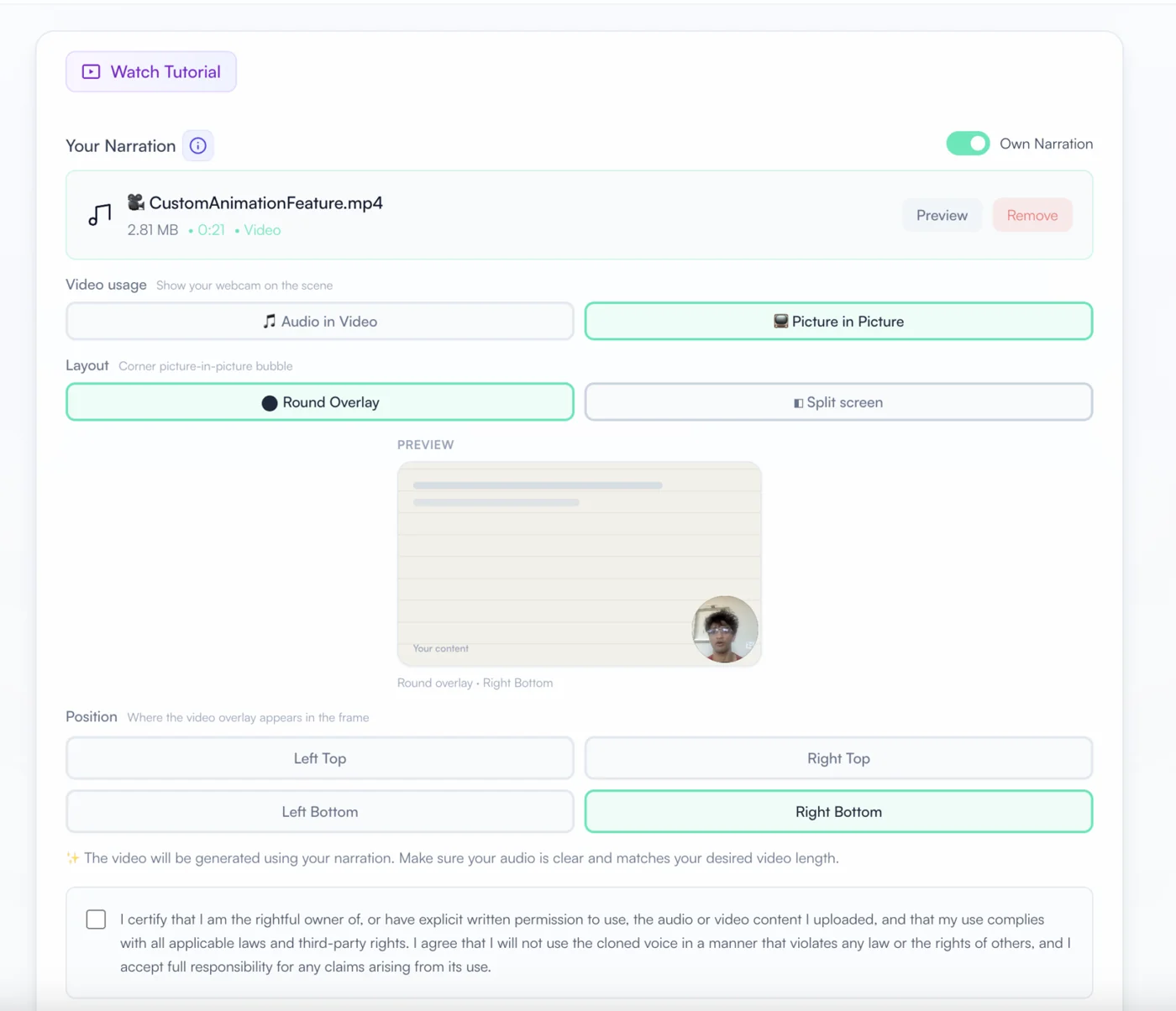
Turn on Own Narration and you can:
- Upload an existing recording — choose Audio in Video to use only its audio track, or Picture in Picture to keep the speaker visible beside the generated content
- Record audio directly — have your executive record a short narration on the spot using Golpo's built-in microphone recorder
- Record via webcam — capture camera and audio, then choose whether the final video uses the audio alone or shows the presenter in Picture in Picture
The result is a short, visually engaging video narrated in the executive's own voice. A prospect hears directly from your CEO about why the company exists and what problem it solves — delivered as a three-minute animated explainer instead of a conference recording link they will never click.
Sales teams can also use the Script Mode toggle when they have an exact script they want the video to follow — useful when legal or compliance needs to approve the language before it goes to prospects.
The Real Power Move: Personalized Videos for Individual Prospects
Everything above is about building a library of sales assets. This section is about what makes Golpo genuinely dangerous in a sales context: personalization at speed.
Imagine your rep has a call with a prospect who runs a logistics company. They care about three specific features: route optimization, real-time tracking, and API integration with their existing TMS. Your rep opens Golpo, writes a quick prompt:
"Create a product overview video showing how our platform helps logistics companies optimize delivery routes, track shipments in real-time, and integrate with existing transportation management systems via API. Focus on reducing delivery costs and improving on-time rates."
Five minutes later, they have a personalized explainer video tailored to that prospect's exact use case. They drop it in the follow-up email. The prospect watches a video that speaks directly to their business — not a generic product overview, but a targeted narrative about their problems and how your product solves them.
That is the kind of follow-up that gets forwarded to the decision-maker.
Sales teams can go even further by attaching product screenshots or demo clips that are relevant to the prospect's industry. Upload a screenshot showing the logistics dashboard. Include a short clip of the API integration flow. Golpo stitches it all into a cohesive video that looks like it was produced by a full creative team — but took one rep five minutes.
How This Fits Into Your Sales Workflow
Golpo is not a replacement for your CRM, your sales engagement platform, or your marketing team's content calendar. It fills a specific gap: the space between "we need a video for this" and "we have a video for this." Here is how it fits:
- Pre-call preparation: Build a quick overview video tailored to the prospect's industry or use case before the first meeting
- Post-demo follow-up: Send a personalized recap video highlighting the features discussed, so the prospect can share it internally with stakeholders who were not on the call
- Deal acceleration: When a deal stalls, send a video from your CEO or CTO speaking directly to the value proposition — executive air cover in video form
- Sales onboarding: New reps ramp faster when product knowledge lives in short videos instead of hundred-page playbooks
- Partner enablement: Give channel partners ready-made product videos they can co-brand and share with their own prospects
Why Video Outperforms Every Other Sales Asset
The data on video in sales is not subtle. Emails with video see higher open and click-through rates. Prospects who watch a product video are significantly more likely to convert. And personalized video outperforms generic content by a wide margin — because it signals effort, relevance, and respect for the prospect's time.
The bottleneck has never been whether video works. It has always been whether sales teams can produce video fast enough to keep up with their pipeline. Golpo removes that bottleneck entirely. A rep can go from idea to finished video in the time it takes to write a follow-up email.
Getting Started
Start with what you already have. Every sales organization has at least one of these:
- A product document or feature sheet — upload it and generate your first overview video
- A product you can screen-record — capture a three-minute walkthrough and let Golpo turn it into a polished demo
- An executive recording — extract the audio from a keynote or all-hands and build a video around it
Once you see how fast Golpo turns raw material into finished video, the question stops being "should we use video in sales?" and becomes "why are we still sending PDFs?"
Your prospects are not reading attachments. Give them something worth watching.


