How We Turned One Instagram Reel Into 8 AI Videos With the Same Narration
We took the narration from Natalie Fratto's brilliant Databricks Reel and used Golpo Own Narration to create eight Canvas versions. Watch every style and follow the complete, repeatable workflow.

One voice · eight visual languages
The narration is Natalie Fratto's, from her public Reel linked above. Crediting her is not a license to download that recording and reuse it. You need her permission before you republish her voice.
We started with a two-minute Databricks explainer we loved, kept its narration unchanged, and generated the story eight times in Golpo Canvas. The result is a controlled style experiment: same words, voice, timing, and subject—only the visual treatment changes.
Natalie's original Reel works because it does not merely list Databricks features. It builds a visual argument: data warehouses are structured but rigid; data lakes are flexible but messy; Apache Spark makes massive data processing possible; and the lakehouse brings the two worlds together. Her narration moves quickly, but each idea creates a clear picture in your head.
We wanted to answer a narrower production question: if the narration is already excellent, how much can the visual style alone change the way the story feels?
8
Canvas outputs
1
unchanged narration
2:11
duration per video
16:9
1536 × 864 output
Watch the same Reel narration in all eight Golpo Canvas styles
Play any two versions back to back. The information does not change, but the perceived personality does. Chalkboard Color feels energetic. Modern Minimal feels calm and premium. Technical turns the lakehouse metaphor into a blueprint. That is the point of this experiment.
What changed when only the style changed?
| Style | What the same story feels like | A natural audience |
|---|---|---|
| Chalkboard Color | Energetic and visual | Social media, classrooms, community |
| Chalkboard B/W | Focused and lecture-like | Education, internal learning |
| Whiteboard | Clear and collaborative | Training, workshops, sales |
| Modern Minimal | Calm and premium | Executives, customers, product stories |
| Playful | Friendly and low-pressure | Beginners, broad consumer audiences |
| Editorial | Intelligent and opinionated | Media, thought leadership, newsletters |
| Sharpie | Bold and handmade | Founder content, fast explainers |
| Technical | Precise and engineered | Developers, data teams, technical buyers |
Our biggest takeaway: style is part of the explanation
Style is not a decorative filter applied after the real work. It changes what viewers expect and how much effort the subject appears to demand.
The playful version says, “You can understand this.” The technical version says, “We will treat the architecture seriously.” The editorial version says, “There is a story and a point of view here.” None is universally best. The best style is the one that reduces the distance between the topic and the intended viewer.
This is why the one-audio, many-styles workflow is useful beyond a demo. A marketing team can test a technical product story for developers, executives, customers, and a general social audience without rerecording the voiceover each time.
How to create these videos with Own Narration
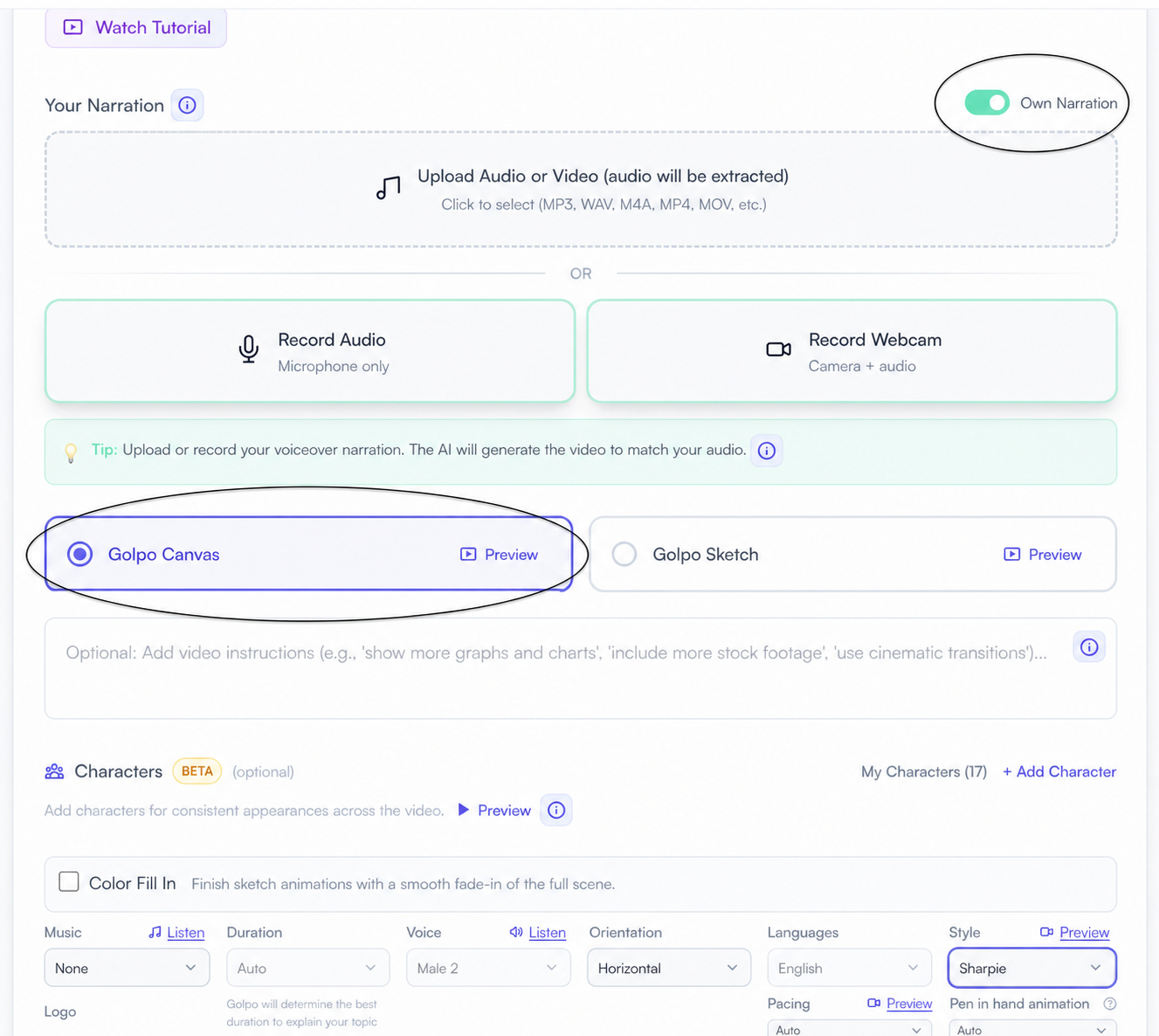
Once you have chosen the story and secured permission to use the recording, the build itself is straightforward. The two controls that matter most are highlighted below: switch on Own Narration, then choose Golpo Canvas.
The exact build sequence
From one authorized recording to eight Canvas styles
- Prepare the recording. Use a clean MP3, WAV, M4A, MP4, or MOV that you own or have permission to repurpose. Trim unnecessary silence.
- Open Golpo's creation page and start a new video.
- Switch on Own Narration. The interface displays Upload Audio or Video, Record Audio, and Record Webcam. For an MP4 or MOV, Golpo extracts the audio.
- Upload or record the narration. The supplied performance becomes the soundtrack; Golpo does not replace it with a generated voice.
- Select Golpo Canvas. Choose Horizontal orientation for a 16:9 result like the eight examples above.
- Add Video Instructions. Ask for clear diagrams, brief on-screen text, and readable names, dates, and numbers. Direct the explanation without imitating the original creator's drawings.
- Choose the first style and remaining settings. Select the music, pacing, language, and Canvas style. Keep every setting except the style unchanged for a controlled comparison.
- Confirm your rights and generate. Certify that you own the recording or have permission to use it, then review synchronization and on-screen text from beginning to end.
- Create the other seven versions. Reuse the same narration and setup, changing only the style: Chalkboard Color, Chalkboard B/W, Whiteboard, Modern Minimal, Playful, Editorial, Sharpie, and Technical.
Frequently asked questions
Can I use audio from any Instagram Reel?
Not automatically. Public access, an Instagram music option, or the ability to download a Reel does not necessarily grant reuse rights outside Instagram. Use audio you created, audio you licensed, or audio you have permission to repurpose. Keep a record of the permission and follow the relevant platform terms.
Does Own Narration clone the speaker's voice?
No. Own Narration uses the supplied recording itself. The exact spoken performance becomes the soundtrack while Golpo creates synchronized visuals around it.
Why are all eight videos the same length?
The narration controls the timeline. All eight supplied videos run 2 minutes 10.8 seconds because they use the same audio. The drawings and scene composition change, but the voice track does not.
Which Canvas style should I choose?
Start with the audience, not your personal favorite. Use Technical for engineering credibility, Modern Minimal for polished product communication, Editorial for thought leadership, Whiteboard for training, and Chalkboard Color, Playful, or Sharpie when energy and approachability matter most.
Can I make this workflow vertical for Reels or Shorts?
Choose a vertical orientation when it is available for your selected Golpo configuration. These eight comparison videos are horizontal 16:9. For a vertical version, check every text block and key drawing inside a 9:16 safe area before publishing.
Make your own controlled style experiment
Choose one narration you have the right to use. Generate it in two deliberately different Canvas styles first—perhaps Technical and Playful, or Chalkboard B/W and Modern Minimal. Show both to somebody in your target audience without telling them which one you prefer. Ask what the video feels like, who it seems to be for, and which ideas they remember.
Then make the remaining versions only if they help you answer a real audience question. Eight outputs look impressive; a clear reason for each style is what makes the workflow valuable.
Your voice, eight visual directions
Upload one authorized narration, choose Golpo Canvas, and discover which visual language makes your story click.
Related Golpo guides
Tags


