How to Clone Your Voice for AI Videos Automatically (2026 Guide)
Create one authorized voice clone, select it for future prompts or scripts, and let Golpo automatically narrate complete illustrated videos in the same recognizable voice. Includes recording, consent, quality review, governance, and an honest comparison with ElevenLabs, HeyGen, Synthesia, and Descript.

Voice cloning turns one authorized voice sample into a reusable narrator. Create the voice once, select it for a new prompt or script, and Golpo automatically generates the narration while building the illustrated video around it.
Only clone your own voice or a voice you have explicit permission to use. Voice Clone is available from the Business plan onward.
Recording every video personally creates a bottleneck. Generic AI narration removes the bottleneck but can also remove the recognizable voice that makes a founder, teacher, executive, or brand feel familiar.
A reusable voice clone sits between those two extremes. You provide an authorized sample once. For each new video, you supply a prompt or script. Golpo generates the new narration in the saved voice and synchronizes the illustrated scenes automatically.
This is not the same as uploading your own audio. Own Narration preserves a finished performance. Voice cloning generates new speech from new text.
Real voice-cloned video examples: new text, the same saved voice
These public projects use saved custom-voice IDs rather than Golpo’s standard voices. The private voice IDs and enrollment samples are intentionally not exposed; the authorized input text and finished S3 MP4 are shown.
Exact English script → saved cloned voice
Enterprise training platform explainer
A reusable account voice narrates a detailed product and training-platform script.
Supplied script
Golpo (YC S25) is the AI video platform built specifically for training, onboarding, and enterprise communication. It transforms any document, SOP, workflow, or internal resource into a high-accuracy whiteboard explainer video…
View the complete script
Golpo (YC S25) is the AI video platform built specifically for training, onboarding, and enterprise communication. It transforms any document, SOP, workflow, or internal resource into a high-accuracy whiteboard explainer video in just minutes. Loved by educators, L&D teams, and enterprise organizations, Golpo is trusted by institutions like Garnet Valley School District, Educator AI, EY, Redwood Investment Group, and more than 2,000 teams. As the world’s first frame-by-frame editable AI video platform, Golpo allows companies to build content that is technically accurate, visually clear, and incredibly easy to update—without relying on avatar-based videos or costly reshoots.

Before Golpo, training content was locked inside PDFs, slide decks, and text-heavy LMS modules. Teams were forced to record manual videos that quickly became outdated, struggled to show technical processes or workflows clearly, and spent significant time or budget on reshoots, agencies, and localization. After Golpo, those same teams can instantly convert any document into a crisp, accurate whiteboard explainer; refresh any frame or narration with a single edit; localize content into 45+ languages; generate up to one hour of coherent training content per video; and do so at a cost that is 45× cheaper than traditional AI video models.

Golpo offers clear business benefits, making it the new standard for L&D. Teams can train faster by generating entire modules—covering onboarding, compliance, safety, SOPs, workflows, and customer support—in minutes. Existing materials like PDFs, manuals, slide decks, Notion pages, and internal documentation can be uploaded directly and automatically converted into structured explainer videos. Updating content is effortless thanks to granular, frame-by-frame editing that allows diagrams, formulas, steps, and narration to be revised without recreating an entire video. Golpo’s instant localization engine translates videos into 45+ languages with native-quality narration and accurate re-rendering of diagrams or labels. And unlike avatar tools, Golpo is built to handle complex, technical content such as diagrams, workflow maps, math formulas, step-by-step instructions, branded visuals, product screenshots, and even embedded real videos and images.

Creating a video with Golpo is simple: upload your content; let Golpo generate a script and storyboard; customize with brand colors, logos, product demos, screenshots, and diagrams; edit frame-by-frame to adjust visuals, timing, animation, or narration; and finally publish or export anywhere—your LMS, knowledge base, or internal tools. Designed specifically for L&D, Golpo includes features like whiteboard-style explainers for maximum comprehension, natural-language editing for any frame, dynamic and expressive narration, 45+ languages, company-wide brand kits, a technical diagram engine, the ability to upload your own assets, and analytics to track engagement and learner progress. Together, these capabilities make Golpo the most powerful and practical AI video platform for training and enterprise communication.
Voice: saved authorized voice clone
Edited how-to script → saved cloned voice
Mac Text Replacement tutorial
The same saved narrator can deliver repeatable instructional content without recording every lesson.
Supplied script
Do you find yourself typing the same long school name, email address, or phrase over and over again? It’s a small thing, but it adds up and increases the chance for typos. Text Replacement on your Mac can help. Here’s how to se…
View the complete script
Do you find yourself typing the same long school name, email address, or phrase over and over again? It’s a small thing, but it adds up and increases the chance for typos. Text Replacement on your Mac can help.

Here’s how to set it up.

First, open System Settings.
In the sidebar, select Keyboard, then click Text Replacements. A new window will open.

Click the plus button to add a new replacement.
In the Replace column, type a short, unique shortcut, for example @gvsd.
In the With column, type the full text you want it to expand to, like Garnet Valley School District or @garnetvalley.org.

Click Add, then Done.

Now, how do you use it?

Type your shortcut in most apps. In many cases, it will automatically expand as soon as you hit the spacebar. In some fields, it may appear as a suggestion instead. If that happens, press the down arrow, then Return to accept it.

That difference is normal. Text Replacement works in most apps, but behavior can vary slightly depending on where you’re typing. If you see the suggestion appear, it means it’s working.

You can use Text Replacement for anything you type often: names, email domains, addresses, or common phrases. It’s a quick setup that saves time and reduces errors every day.
Voice: saved authorized voice clone
Arabic narration text → saved cloned voice
How a snakebite injects venom
A saved custom voice narrates new Arabic educational copy, showing that the workflow is not limited to English.
Supplied script
تعمل أنيابها كإبرة طبية تحت الجلد؛ فالناب ليس مجرد سن حاد، بل هو بنية مجوفة دقيقة تتصل مباشرة بغدة السم الموجودة خلف العين. وعند اللدغ، تنقبض عضلات قوية تحيط بهذه الغدة، فتضغط عليها كما يُضغط على محقنة، دافعةً السم بقوة عبر قنا…
View the complete script
تعمل أنيابها كإبرة طبية تحت الجلد؛ فالناب ليس مجرد سن حاد، بل هو بنية مجوفة دقيقة تتصل مباشرة بغدة السم الموجودة خلف العين. وعند اللدغ، تنقبض عضلات قوية تحيط بهذه الغدة، فتضغط عليها كما يُضغط على محقنة، دافعةً السم بقوة عبر قناة الناب ليخرج من فتحة دقيقة في طرفه، ويُحقن مباشرة في مجرى الدم.

في غضون لحظات، يبدأ السم بالانتشار داخل الجسم عبر الأنسجة والأوعية الدموية، حاملاً معه مزيجًا معقدًا من البروتينات والإنزيمات السامة. بعض هذه السموم يهاجم الجهاز العصبي، فيعطل الإشارات بين الأعصاب والعضلات، بينما يستهدف بعضها الآخر الدم أو الخلايا، مما يؤدي إلى شلل الجسم أو انهيار وظائفه الحيوية بسرعة.

إن هذا النظام للحقن السريع يُعد من أكثر آليات الافتراس كفاءة، إذ يسمح للأفعى بإخضاع الفريسة خلال وقت قصير للغاية.
Voice: saved authorized voice clone
The voice-cloned video workflow
authorized sample → saved voice → new prompt or script → generated narration → illustrated scenes → finished video
That workflow is useful for:
- a founder narrating product and investor explainers;
- a CEO delivering recurring company updates;
- a teacher creating a course library;
- an L&D leader standardizing the voice across training modules;
- a creator publishing frequently without recording every episode;
- a multilingual team maintaining a consistent narrator where supported.
How to clone your voice and use it in a video
1. Confirm rights and consent
Clone only a voice you own or have explicit permission to use. Document the speaker, purpose, authorized users, approved channels, and revocation process for company use.
Do not clone a celebrity, customer, employee, or public figure without valid authorization. A technically convincing clone does not create legal or ethical permission.
2. Prepare a clean sample
Read a short script out loud. Use wording close to the narration you want this voice to deliver in the video. A sample near 50–60 seconds produces a better clone than a 10–20 second clip.
Golpo records up to 60 seconds in the Voice Clone dialog. You can also upload an MP3 or WAV up to 5 MB.
Aim for:
- one speaker;
- a quiet, non-echoing room;
- no music or sound effects;
- natural, consistent delivery;
- no clipping or aggressive noise reduction;
- a script similar to the videos this voice will narrate.
The clone learns the room, the pace, and the kind of sentences in the sample. A script that sounds like the future narration gives a closer match than a few seconds of unrelated speech.
3. Open Voice Clone
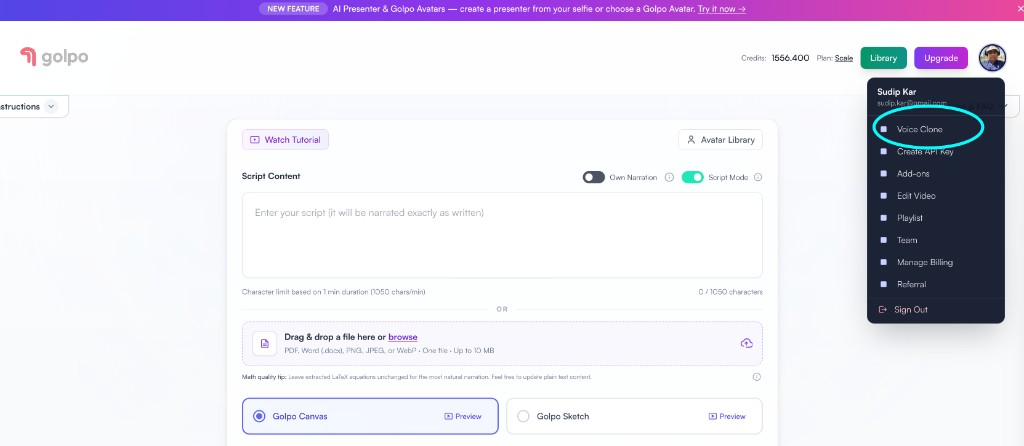
Sign in at video.golpoai.com. Open the account menu in the top right and choose Voice Clone. Voice Clone is available from the Business plan onward.
4. Create and name the voice
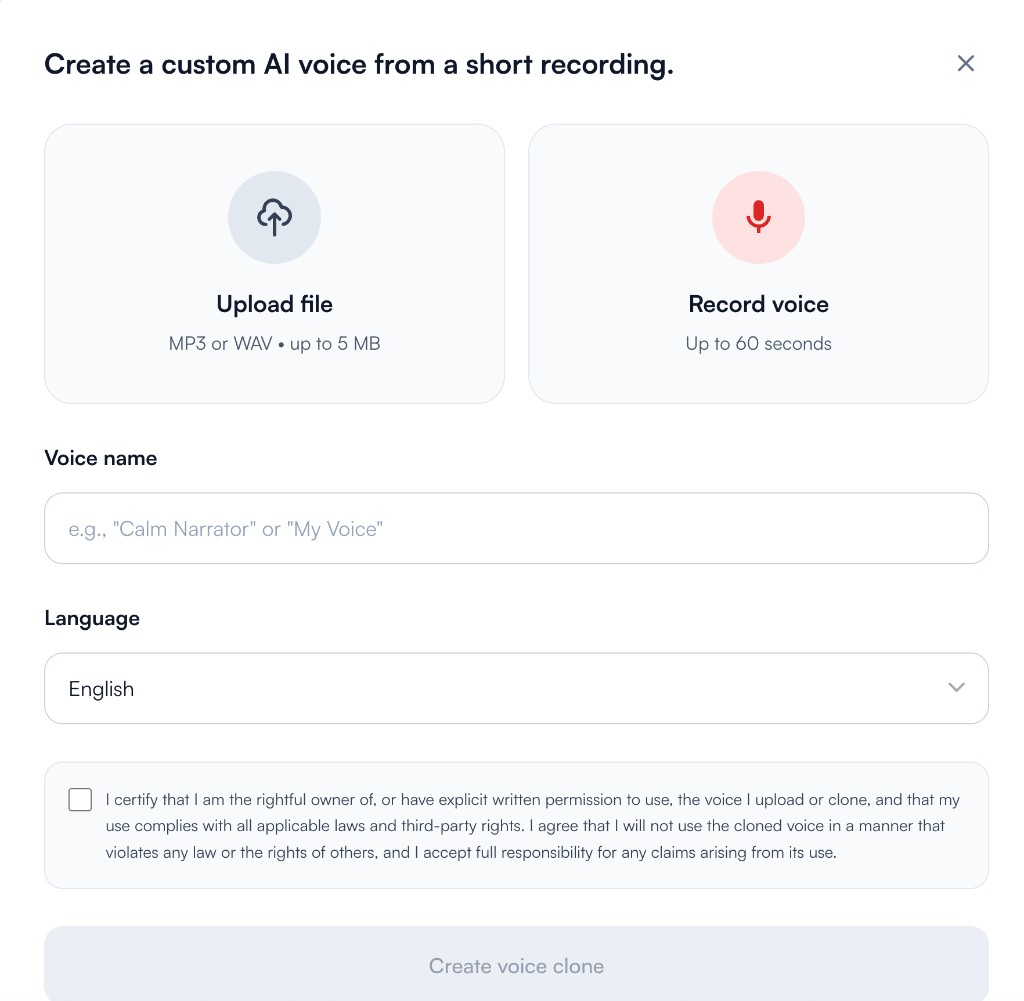
Choose Upload file for an MP3 or WAV up to 5 MB, or Record voice for a take up to 60 seconds. Add a voice name, choose the language, and confirm you have the right to use the voice. Then choose Create voice clone.
Use names that will still be clear to a team six months later, such as:
- Founder — calm product explainer;
- L&D narrator — US English;
- Biology teacher — classroom pace;
- Brand voice — approved July 2026.
5. Start a new video
Return to the video creation page. Choose either:
- a normal prompt when Golpo may develop the script; or
- Script Mode when the supplied words must be followed.
The text-to-video guide covers the idea-to-script workflow. The script-to-video guide covers exact-copy production.
6. Select the saved clone
Open the Voice control and choose the saved voice clone. Preview it when the product offers a sample. Check names, acronyms, numbers, and any sentence that depends on unusual emphasis.
Voice Instructions can help with pacing and delivery when applicable, but they cannot repair a poor source sample. If the clone consistently sounds wrong, improve the authorized sample rather than stacking contradictory instructions.
7. Choose the visual treatment
Select Golpo Sketch or Golpo Canvas, then configure orientation, style, color, pacing, music, and other applicable options.
For a recognizable brand system, combine the clone with:
- Custom Style for reusable visual identity;
- Video Instructions for scene and typography rules;
- an uploaded logo;
- inserted product images and screenshots;
- frame-by-frame editing for corrections.
The combination of consistent voice, consistent visual style, and reviewed source material is what makes a video library feel like one brand rather than a set of unrelated AI outputs.
8. Generate and review the narration
Listen to the full output before publishing. Verify:
- voice similarity and naturalness;
- pronunciation of proper nouns and acronyms;
- emotional fit;
- pauses around numbers and lists;
- absence of artifacts;
- scene synchronization;
- approved use of the speaker’s identity.
Keep a fallback built-in voice for urgent production. If a cloned read fails quality review, do not publish it merely because the visual layer is finished.
Golpo vs voice-cloning and avatar tools in 2026
| Tool | What it is best at | Video result | Choose Golpo when |
|---|---|---|---|
| Golpo | Voice-cloned illustrated explainers | Your cloned voice narrates generated Sketch or Canvas scenes | The audience needs to see the concept, process, or story |
| ElevenLabs | Dedicated voice generation and cloning | Primarily audio; connect it to another video workflow | You want narration and visual generation in one explainer tool |
| HeyGen | Voice clone plus realistic avatar | A digital person delivers the script | You prefer illustrated explanation over a talking avatar |
| Synthesia | Enterprise avatar video and localization | Avatar/template scenes with cloned voice | The content should be diagrammed and drawn rather than presented |
| Descript | Editing and voice repair inside an audio/video editor | Transcript-led production | You want automatic explainer scenes after the script is ready |
ElevenLabs is the stronger specialist when the deliverable is a high-control audio asset or when a developer needs a dedicated voice API. HeyGen and Synthesia are stronger when the visible digital presenter is central. Their official products combine cloned voices with avatars and multilingual delivery.
Golpo is the best fit for voice-cloned explainer animation. The cloned narrator is not forced into a talking-head template; the screen remains available for diagrams, maps, examples, processes, and visual storytelling.
Official capability pages checked July 2026: ElevenLabs Instant Voice Cloning, HeyGen AI Voice Cloning, and Synthesia Voice Cloning.
Voice clone vs Own Narration vs Picture in Picture
These features solve different problems.
| Feature | What the audience hears | What the audience sees |
|---|---|---|
| Voice clone | New AI-generated speech in the saved voice | Generated explainer scenes |
| Own Narration | The exact uploaded or recorded performance | Generated scenes |
| Picture in Picture | The exact audio from a presenter video | Generated scenes plus the preserved presenter video |
Use Own Narration when emotional timing and exact delivery are already recorded. Use Picture in Picture when the person must remain visible. Use a voice clone when repeatability matters most.
Governance for teams
For business use, record:
- who owns the source voice;
- who approved the clone;
- who may generate with it;
- which languages and channels are permitted;
- how the voice will be removed when access ends;
- who performs the final review.
Do not share a voice clone under a vague team label. Identity is a production asset and should have an owner.
Frequently asked questions
Does voice cloning automatically create the video?
After the clone is created and selected, Golpo generates narration from the new prompt or script and creates the matching video. You still choose the content and production settings.
Is a voice clone the same as uploading a recording?
No. A clone generates new speech from text. Own Narration uses the exact supplied audio performance.
Can I clone someone else’s voice?
Only with explicit authorization and in compliance with applicable law and platform terms. For a company narrator, document permission and approved use.
Which Golpo plans include voice cloning?
Voice Clone is available from the Business plan onward.
How long should the voice sample be?
Read a script similar to the narration you want in the video. About 50–60 seconds of clean audio performs better than 10–20 seconds. Golpo records up to 60 seconds, and an uploaded sample can be an MP3 or WAV up to 5 MB.
Is Golpo better than ElevenLabs for voice cloning?
They serve different primary jobs. ElevenLabs is a dedicated voice platform. Golpo is the better single workflow when the desired output is an illustrated explainer video narrated by the clone.
Can the clone narrate multiple videos?
Yes. Reusability is the main benefit: select the saved voice for future eligible projects instead of recording each script again.
Related guides
- Text to video from an idea or prompt
- Exact script to video
- Your own audio to video
- Voice Instructions for generated narration
- Golpo pricing and feature availability
Record once. Narrate the next approved script automatically.
Create an authorized voice clone, select it for a new video, and let Golpo build the illustrated explanation around it.


