Golpo Stock Avatars: 20 Ready-to-Use Presenters and Video Examples
Choose a ready-to-use Golpo presenter without uploading a selfie. Follow the Stock Avatar workflow, explore all 20 presenters, and play their video examples inside the guide. Stock Avatar videos use 3 credits per minute.

A presenter can make an explanation feel personal. With Golpo Stock Avatars, you can add that presenter without uploading a selfie or creating a custom avatar. Choose one of Golpo's 20 ready-to-use presenters, select a narration voice, and combine the avatar with the visuals that explain your idea.
Stock Avatar videos use 3 credits per minute. Each example below pairs a named stock presenter with a distinct video, voice, and visual style. You can play the videos inside this guide and use the player's full-screen button to expand them.
Combine a ready-to-use presenter with Golpo, the world's best AI explainer video maker, for a winning combination: a face that guides the audience and animated visuals that make the explanation easier to follow.
Meet Golpo's ready-to-use presenters
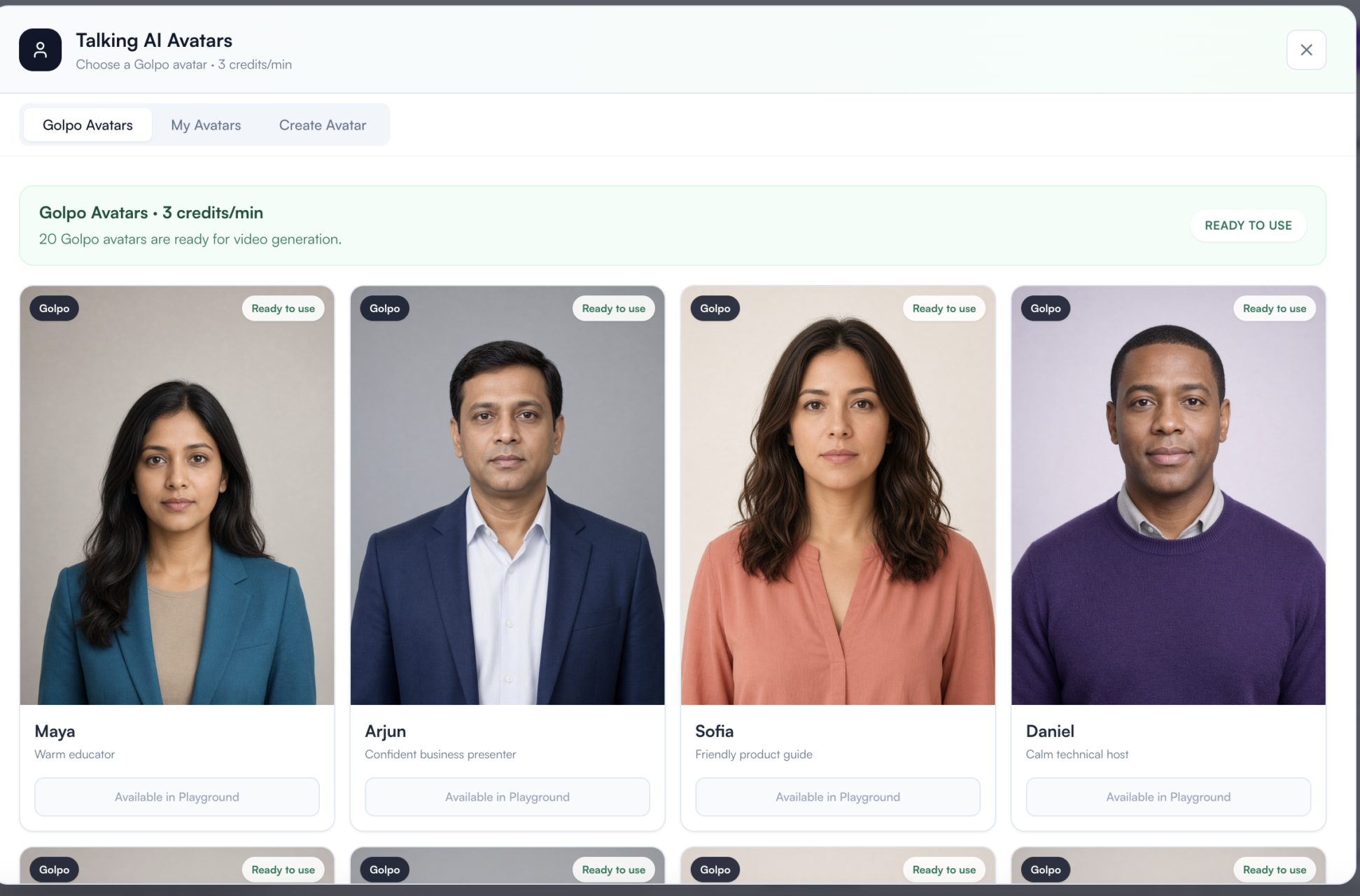
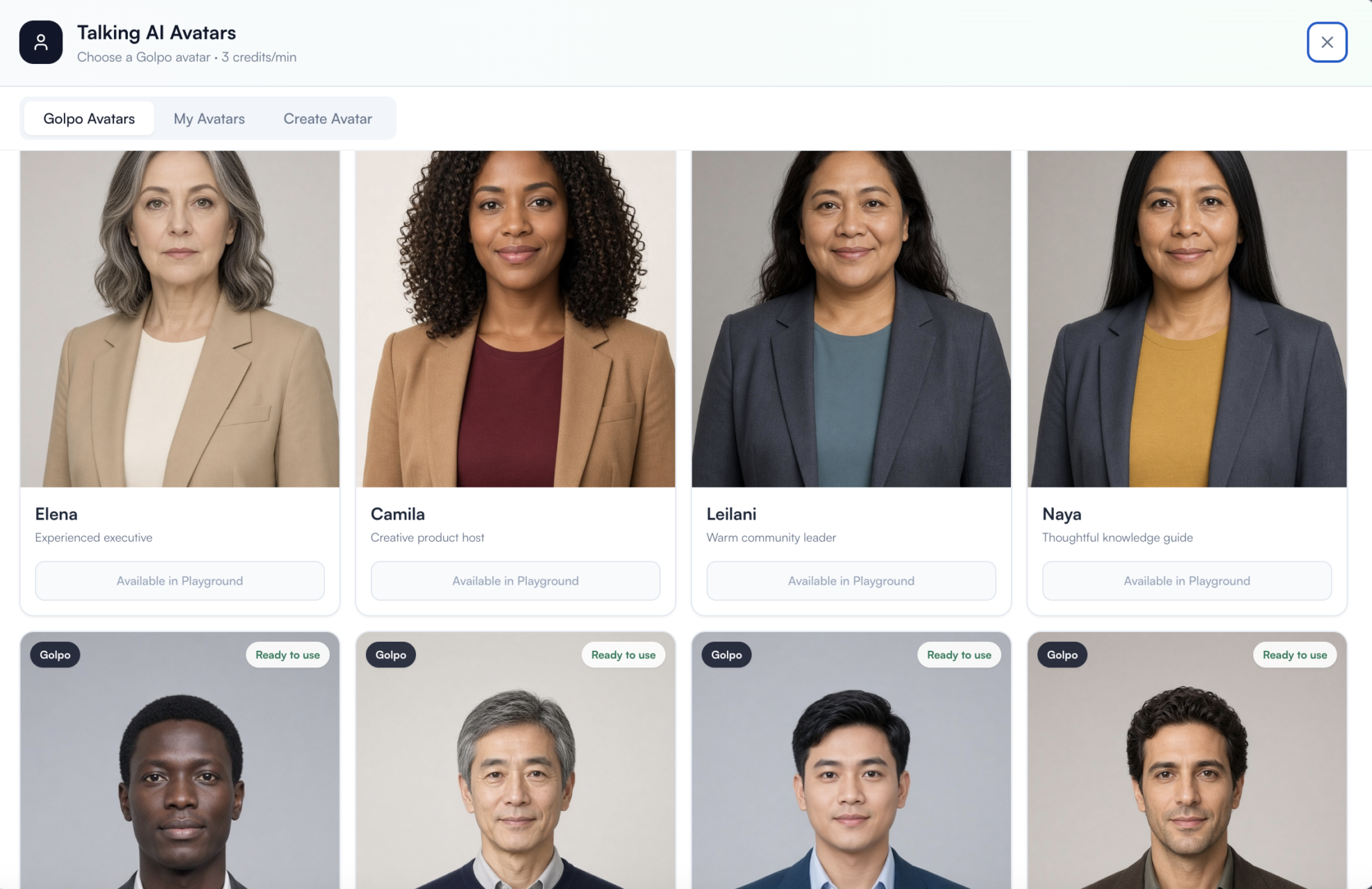
Open Talking AI Avatars → Golpo Avatars to browse the stock library. Each card displays a presenter name and a short description, such as Maya — warm educator, Arjun — confident business presenter, Sofia — friendly product guide, or Daniel — calm technical host.
The library screenshot shows 20 avatars ready for video generation. You can choose a stock presenter directly; you do not need to upload an image or go through the custom-avatar creation workflow.
How to use a Stock Avatar, step by step
1. Start with the idea or script
Open Golpo and begin your video. Add a prompt describing what you want to explain, or supply your own script when you want control over the narration.
For a first attempt, choose one clear idea. The gallery gives you practical starting points: Maya introduces an empathy story, Daniel explains how an internet click travels, and Mateo explains why Earth has seasons.
2. Choose the video orientation
The 20 stock examples in this guide use landscape 16:9. Choose that orientation to follow these examples. If you are making a vertical video, choose the portrait format and review how the presenter and visuals share that frame.
3. Enable Talking AI Avatar
In the video settings, turn on Talking AI Avatar. Open the avatar chooser using Golpo / Golpo Avatars.
4. Select your stock presenter by name
Browse the ready-to-use avatars and choose a presenter. Use the name in the gallery to find the same avatar in Golpo: select Maya for The Invisible Backpack We All Carry, Sofia for The Button Nobody Wanted to Click, or Lukas for Which Decisions Deserve More Analysis.
Check that the selected card shows the presenter you intended to use. A stock selection uses the 3 credits/min rate.
5. Choose the narration voice
Select the voice separately from the avatar. The examples below use built-in voices, with no voice cloning. Each video card lists the voice used, such as Female 3, Female 4, Male 3, or Male 4.
For example, Maya's video uses Female 3, while Arjun's uses Male 4. Choose those voices to follow the example setup, or choose a different voice for your own narration.
6. Choose how the presenter appears
Choose Side by side, Round overlay, Full screen, or Auto, depending on your video and orientation. Check the live preview to see the balance between the presenter and the supporting content.
All 20 stock videos in this gallery use Auto. Auto chooses among compatible approved layouts for each scene. It can change the presentation and may briefly hide the presenter to keep important content unobstructed.
7. Select the visual engine and style
Choose Golpo Canvas or Golpo Sketch, then choose a visual style. The presenter stays part of the explanation while the surrounding visuals take on that treatment.
Maya's empathy story uses Canvas · Illustration. Daniel's internet explainer uses Sketch · Infographics. Minh's startup story uses Canvas · Notebook. Every card below lists the corresponding engine and style so you can try the same combination.
8. Set optional background music
Choose music that suits the explanation. The examples use options such as Inspirational, Engaging, Documentary, Jazz, Lo-fi, Hyper, and Dramatic. Each card lists its music choice; use it as a starting point when recreating that example's setup.
9. Review the settings and credit rate
Confirm the presenter name, voice, orientation, layout, style, and video duration. Check that the selected Avatar rate is 3 credits per minute before generating the video.
10. Generate and review the video
Continue with video generation. Review the finished video in your Library and check the narration, presenter, visual clarity, and pacing. Use the examples below to compare how the same Stock Avatar feature works across different subjects and styles.
Three combinations to try first
| Starting point | Presenter | Voice | Visual treatment | Layout and format | Music |
|---|---|---|---|---|---|
| An empathy story | Maya | Female 3 | Canvas · Illustration | Auto · landscape 16:9 | Inspirational |
| A technical explainer | Daniel | Male 3 | Sketch · Infographics | Auto · landscape 16:9 | Documentary |
| A startup lesson | Minh | Male 4 | Canvas · Notebook | Auto · landscape 16:9 | Engaging |
To recreate one of these setups, follow the steps above and copy its presenter, voice, engine, style, layout, orientation, and music selections. Supply your own prompt or script for the story you want to tell.
Find a Stock Avatar and the corresponding example
Watch all 20 Stock Avatar videos
The gallery pairs every presenter with their corresponding video and settings. Press Play to watch here. Use the YouTube player's full-screen button to expand a video, then press Esc to return to the guide.
These examples use synthetic stock presenters, AI-generated visuals, and built-in narration voices. They show completed Golpo videos across different topics and styles.
1. Maya — warm educator
The Invisible Backpack We All Carry
Recreate this setup: Maya · Female 3 built-in voice · Canvas · Illustration · Inspirational music.
Auto Avatar layout · landscape 16:9 · 3 credits/min.
2. Arjun — confident business presenter
The Two Clocks Behind Every Decision
Recreate this setup: Arjun · Male 4 built-in voice · Sketch · Formal · Engaging music.
Auto Avatar layout · landscape 16:9 · 3 credits/min.
3. Sofia — friendly product guide
The Button Nobody Wanted to Click
Recreate this setup: Sofia · Female 4 built-in voice · Canvas · Playful · Engaging music.
Auto Avatar layout · landscape 16:9 · 3 credits/min.
4. Daniel — calm technical host
How the Internet Delivers a Single Click
Recreate this setup: Daniel · Male 3 built-in voice · Sketch · Infographics · Documentary music.
Auto Avatar layout · landscape 16:9 · 3 credits/min.
5. Amina — composed analyst
The Average That Hid the Truth
Recreate this setup: Amina · Female 3 built-in voice · Canvas · Editorial · Jazz music.
Auto Avatar layout · landscape 16:9 · 3 credits/min.
6. Mei — science guide
What If You Could Enter an Atom
Recreate this setup: Mei · Female 4 built-in voice · Sketch · Creative · Dramatic music.
Auto Avatar layout · landscape 16:9 · 3 credits/min.
7. Sari — upbeat trainer
Practice the Moment That Usually Breaks
Recreate this setup: Sari · Female 4 built-in voice · Canvas · Sharpie · Hyper music.
Auto Avatar layout · landscape 16:9 · 3 credits/min.
8. Layla — trusted advisor
A Five-Minute Meeting With Future You
Recreate this setup: Layla · Female 3 built-in voice · Sketch · Professional Clean · Lo-fi music.
Auto Avatar layout · landscape 16:9 · 3 credits/min.
9. Elena — experienced executive
Why Great Meetings Need an Empty Chair
Recreate this setup: Elena · Female 3 built-in voice · Canvas · Modern Minimal · Inspirational music.
Auto Avatar layout · landscape 16:9 · 3 credits/min.
10. Camila — creative product host
The Creative Power of One Bad Rule
Recreate this setup: Camila · Female 4 built-in voice · Sketch · Crayon · Engaging music.
Auto Avatar layout · landscape 16:9 · 3 credits/min.
11. Leilani — warm community leader
The Favor That Travels Past You
Recreate this setup: Leilani · Female 3 built-in voice · Canvas · Whiteboard · Engaging music.
Auto Avatar layout · landscape 16:9 · 3 credits/min.
12. Naya — thoughtful knowledge guide
Forgetting Is Part of Learning
Recreate this setup: Naya · Female 3 built-in voice · Sketch · Chalkboard (Black on White) · Documentary music.
Auto Avatar layout · landscape 16:9 · 3 credits/min.
13. Kofi — growth strategist
Build a Flywheel Not a Funnel
Recreate this setup: Kofi · Male 4 built-in voice · Canvas · Technical · Hyper music.
Auto Avatar layout · landscape 16:9 · 3 credits/min.
14. Hiro — senior technical expert
Why GPS Needs Einstein's Physics
Recreate this setup: Hiro · Male 3 built-in voice · Sketch · Dry Erase · Documentary music.
Auto Avatar layout · landscape 16:9 · 3 credits/min.
15. Minh — startup explainer
Test a Startup Before Building It
Recreate this setup: Minh · Male 4 built-in voice · Canvas · Notebook · Engaging music.
Auto Avatar layout · landscape 16:9 · 3 credits/min.
16. Omar — confident business host
The Most Powerful Sound in Negotiation
Recreate this setup: Omar · Male 4 built-in voice · Sketch · Classic (with words) · Jazz music.
Auto Avatar layout · landscape 16:9 · 3 credits/min.
17. Mateo — approachable educator
The Real Reason Earth Has Seasons
Recreate this setup: Mateo · Male 3 built-in voice · Sketch · Improved (Beta) · Inspirational music.
Auto Avatar layout · landscape 16:9 · 3 credits/min.
18. Tane — grounded team lead
Run the Failure Before It Happens
Recreate this setup: Tane · Male 4 built-in voice · Canvas · Chalkboard Color · Dramatic music.
Auto Avatar layout · landscape 16:9 · 3 credits/min.
19. Noah — calm senior mentor
How Do You Warn the Distant Future
Recreate this setup: Noah · Male 3 built-in voice · Sketch · Classic · Documentary music.
Auto Avatar layout · landscape 16:9 · 3 credits/min.
20. Lukas — clear consultant
Which Decisions Deserve More Analysis
Recreate this setup: Lukas · Male 3 built-in voice · Canvas · Chalkboard (White on Black) · Lo-fi music.
Auto Avatar layout · landscape 16:9 · 3 credits/min.
Stock Avatar credits: 3 credits per minute
| Video duration | Stock Avatar video credits |
|---|---|
| 1 minute | 3 credits |
| 2 minutes | 6 credits |
| 4 minutes | 12 credits |
These examples apply the Stock Avatar rate to the stated duration. You do not need to create a custom portrait to choose one of Golpo's ready-to-use stock presenters.
If you want to use your own uploaded image or selfie, a custom Avatar video uses 5 credits per minute. See the custom Avatar creation and layout guide.
Frequently asked questions
Do I need a selfie to use a Stock Avatar?
No. Open Golpo Avatars and select a ready-to-use presenter from the library.
How many Stock Avatars can I choose from?
The library shown here contains 20 stock presenters. This guide includes a corresponding example for each of them.
Does choosing a Stock Avatar automatically choose a voice?
Choose and review the narration voice separately. Each example lists the built-in voice used so you can follow its setup. These videos do not use a cloned voice.
Can I combine a Stock Avatar with Canvas or Sketch?
Yes. The gallery includes ten Canvas examples and ten Sketch examples, with a different visual treatment for each presenter.
Can I change the presentation layout?
Yes. Choose a compatible presentation option and inspect the live preview. The examples here use Auto in landscape 16:9; the custom Avatar guide also demonstrates split, round overlay, and vertical layouts.
Can I watch and expand the examples without leaving this guide?
Yes. Each example has an embedded YouTube player. Press Play, then use the full-screen button to expand the video.
How much does a Stock Avatar video cost in credits?
Stock Avatar videos use 3 credits per minute. A two-minute Stock Avatar video uses 6 credits; a four-minute video uses 12 credits.
Choose a presenter and make your next explanation
Start with a voice, a presenter, and one clear idea. Choose the visual style that supports the story, preview your layout, and let Golpo turn the combination into a video.
Create a Stock Avatar video in Golpo →
Related guides
Tags


